Honeywell 209920A Wall Cover Plate Installation Guide
Installation guide for the Honeywell 209920A Wall Cover Plate. Includes mounting steps, compatibility list, and dimensions for covering wall marks when upgrading your thermostat.
Quick answers from the manual
Quick answer
- The 209920A Wall Cover Plate is used to cover wall marks left by old thermostats when installing a new Honeywell T7512, T7516, T7518, T8131, or T8132 thermostat. p. 1
Key actions
- Disconnect power before installation. p. 1
- Mount the cover plate, then the thermostat wiring plate over it. p. 1
Technical specifications
| Parameter | Value | Meaning | Pages |
|---|---|---|---|
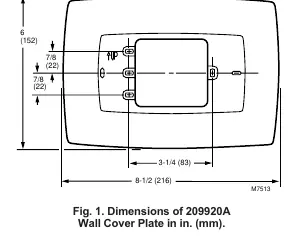
| Dimensions | 8-1/2 in. x 6 in. | Physical size of the cover plate | p. 1 |
Where to find it in the PDF
- Installation Instructions p. 1
- Assembly Diagram p. 2
Table of contents
Manual images
Click an image to enlargeQuick installation guide
The Honeywell 209920A Wall Cover Plate is designed to conceal wall marks left by previous thermostats. Installation requires basic tools and should be performed by a trained technician. Always disconnect power before starting.
Compatibility
This cover plate is compatible with the following Honeywell thermostat models: T7512, T7516, T7518, T8131, and T8132.
Installation
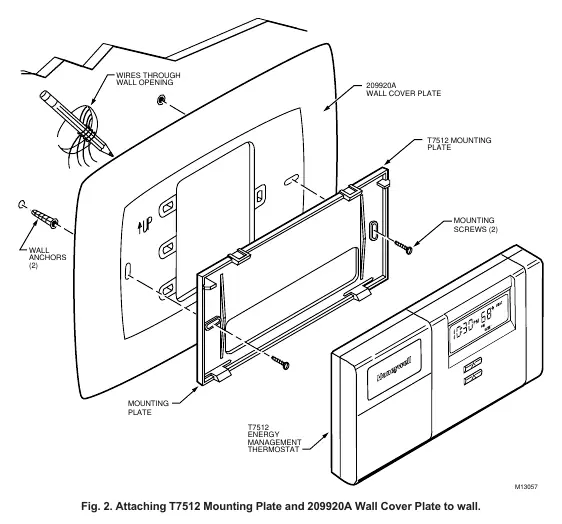
- Disconnect the power supply to the thermostat equipment to prevent damage.
- Mark and drill holes on the wall or 2 x 4 in. outlet box as required by the specific thermostat's installation instructions.
- Position the wall cover plate over the wall or outlet box.
- Mount the thermostat or thermostat wiring plate over the cover plate.
- Pull the wires through the wiring opening.
- Secure the assembly using the screws included with the thermostat, ensuring it is level and tightened.
Dimensions
The cover plate measures 8-1/2 inches (216 mm) in width and 6 inches (152 mm) in height.
Manufacturer information
Honeywell International Inc.
Practical help
Common problems
Install the 209920A Wall Cover Plate to conceal the area.
Before use
- Disconnect power supply
- Verify compatibility with T7512, T7516, T7518, T8131, or T8132
- Ensure 2 x 4 in. outlet box is available if not mounting directly to wall

Manual page author
Michael Turner
Technical manual editor
Reviews PDF manuals for structure, safety notes, and practical product details so readers can find the right information quickly.