Documents / Warranty Safety
Honeywell Voyager 1450g/1452g/1450g2DHR Series Area-Imaging Scanner User's Guide
Comprehensive user guide for the Honeywell Voyager 1450g, 1452g, and 1450g2DHR area-imaging scanners, covering installation, configuration, cordless operation, maintenance, and troubleshooting.
Table of contents
Product Overview
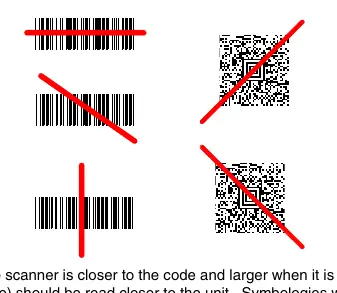
The Honeywell Voyager 1450g (corded) and 1452g (cordless) are high-performance area-imaging scanners. The 1450g2DHR model is specifically designed for high-density applications. These scanners are factory-programmed for common settings, but can be customized by scanning specific configuration bar codes provided in this guide.
Installation and Setup
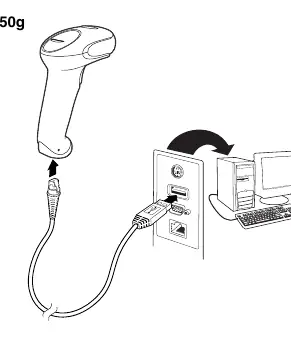
Scanners can be connected via USB, Keyboard Wedge, RS232 Serial, or RS485 interfaces. For cordless models, the CCB01-010BT charge base must be connected to a power source and the host computer. The scanner links to the base automatically when placed in the cradle for the first time.
Cordless System Operation
The cordless system utilizes Bluetooth technology for communication. Key features include:
- Linking: Scanners link to a base or Access Point. Multiple scanners can be linked to a single base.
- Batch Mode: Allows data storage when the scanner is out of range, with automatic transmission upon reconnection.
- Battery Management: The integrated lithium-ion battery charges while the scanner is in the base. Proper disposal of batteries is required according to local regulations.
Programming and Configuration
The scanner is configured by scanning menu bar codes. Users can set interface types, keyboard layouts, data formatting (prefixes/suffixes), and symbology-specific parameters. Custom defaults can be saved and restored as needed.
Maintenance and Troubleshooting
To maintain optimal performance, keep the scanner window clean using a soft cloth dampened with water or a mild detergent. Do not use abrasive materials or harsh solvents. If the scanner fails to operate, check cable connections, ensure the host system is powered, and verify that the correct symbologies are enabled. For cordless systems, ensure the battery is charged and the scanner is properly linked to its base.
Technical Specifications
The scanners feature a 640 x 480 (or 1280 x 800 for 2DHR) image resolution, with operational temperature ranges from 0°C to 40°C. Detailed pinout diagrams for various cables are provided to ensure correct installation.
Related manuals
Related manuals from the same brand or category.
Power / Batteries Chargers
Honeywell GaN 140W Ultra Fast Wall Charger Owner’s Manual
HoneywellElectronics / Televisions
Honeywell Voyager 1400g Series Area-Imaging Scanner
HoneywellComputers / Printers
Honeywell Hyperion 1300g Handheld Linear Scanner User's Guide
HoneywellComputers / Printers
Honeywell Voyager 1250g Single Line Laser Scanner User Guide
HoneywellComputers / Printers