General / Other Manuals
HP 15-FD1016NF User Manual
Comprehensive user guide for the HP 15-FD1016NF laptop, covering setup, hardware components, network connectivity, entertainment features, power management, maintenance, and security.
Table of contents
Product Overview
The HP 15-FD1016NF is a versatile laptop designed for both work and entertainment. This manual provides essential information on hardware components, software features, and system maintenance to ensure optimal performance.
Getting Started
After initial setup, it is recommended to create recovery media, connect to a network, and familiarize yourself with the hardware and software. Use the HP Support Assistant application to optimize performance and resolve issues.
Hardware Components
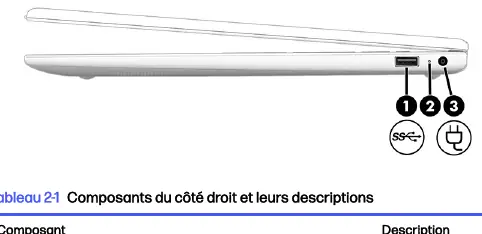
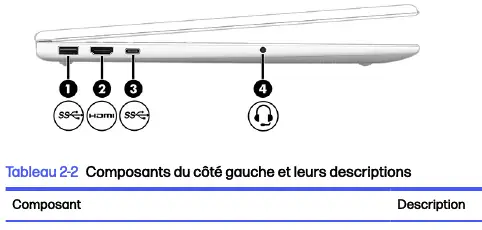
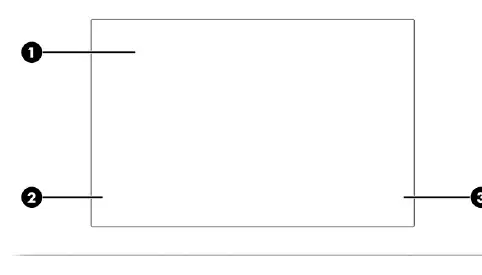
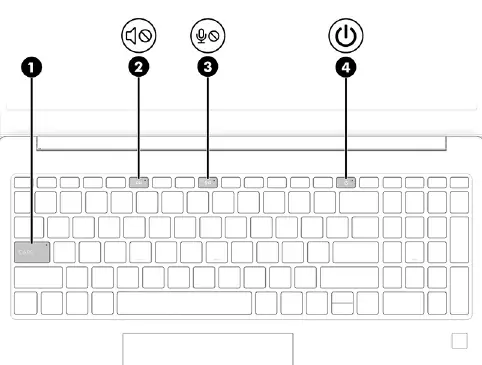
The laptop features various ports and indicators, including USB Type-A and USB Type-C ports, an HDMI port for external displays, and a combined audio jack. The keyboard includes action keys for quick system control, and the touchpad supports multi-finger gestures for navigation.
Network Connectivity
The device supports wireless connections via WLAN, Bluetooth, and optional mobile broadband. Wired LAN connections are also supported via an appropriate adapter if an RJ-45 port is not present.
Power Management
Manage your battery life by using Sleep and Hibernation modes. The laptop supports HP Fast Charge for quick battery replenishment. Always use the provided power adapter to ensure safety and optimal charging.
Maintenance and Security
Regular maintenance, such as disk defragmentation and disk cleanup, helps maintain system speed. Keep your data secure by using Windows passwords, fingerprint authentication via Windows Hello, and up-to-date antivirus software. Always follow safety guidelines when cleaning the device, using only recommended materials.
Troubleshooting and Diagnostics
If you encounter hardware issues, use the built-in HP PC Hardware Diagnostics tools (Windows or UEFI) to identify and resolve problems. If a failure code is generated, contact HP support for assistance.
Related manuals
Related manuals from the same brand or category.
General / Other Manuals
HP 12c Financial Calculator: Quick Start Guide
HPGeneral / Other Manuals
HP 126-inch Dual Roll Kit Introductory Information
HPGeneral / Other Manuals
HP Latex 126-inch Free-Fall Roll Kit User Guide
HPDocuments / Warranty Safety