Electronics / USB Extenders
User Manual for Icron USB 2.0 Ranger 2312 Extender System
Quick start guide and setup instructions for the Icron USB 2.0 Ranger 2312 extender system. Learn how to connect the LEX and REX units, power requirements, and warranty information.
Table of contents
Quick guide from the manual
Follow these steps to set up your Icron USB 2.0 Ranger 2312:
- Install Drivers: Ensure all drivers required for your USB devices are installed on your computer before starting.
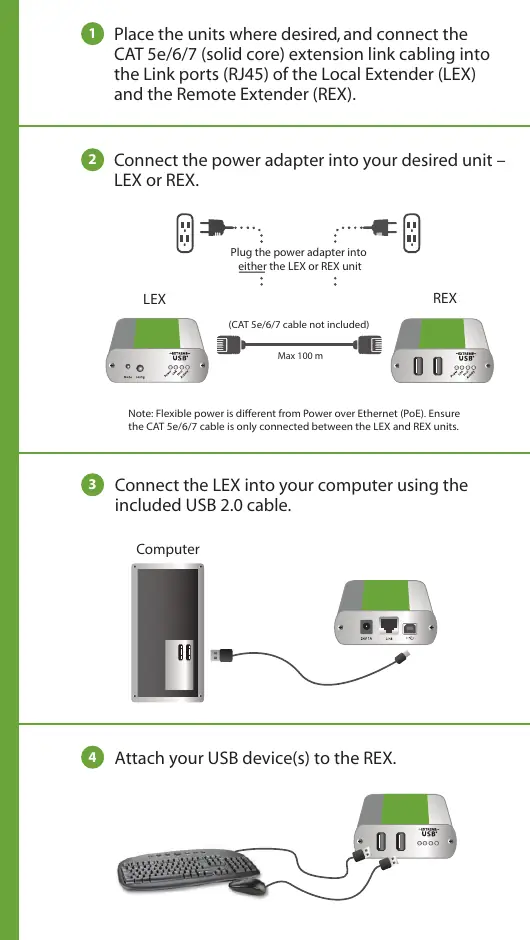
- Connect Link Cable: Place the LEX and REX units in desired locations. Connect a CAT 5e/6/7 (solid core) cable between the Link ports (RJ45) of the LEX and REX units.
- Connect Power: Plug the included power adapter into either the LEX or the REX unit.
- Connect to Computer: Connect the LEX unit to your computer using the provided USB 2.0 cable.
- Connect Devices: Attach your USB device(s) to the REX unit.
Product Overview
The Icron USB 2.0 Ranger 2312 is a 2-port USB 100m CAT 5e/6/7 extender system. It features Flexible Power, allowing the power adapter to be connected to either the Local Extender (LEX) or the Remote Extender (REX).
Important Notes
- Flexible Power: This is different from Power over Ethernet (PoE). Ensure the CAT 5e/6/7 cable is only connected between the LEX and REX units.
- Cabling: The CAT 5e/6/7 cable is not included.
- Storage: Store the product in a dry location between -20°C and 70°C.
Warranty and Support
Icron provides a two-year hardware warranty. To obtain warranty service, you must contact Icron to receive a Return Material Authorization (RMA) number. Returns without an RMA number will not be accepted. Include serial numbers of both LEX and REX units in correspondence. For technical support, visit www.icron.com/support.
Official resources from the manual
Manufacturer information
Icron Technologies Corp
Practical help
Common problems
Device not working
Ensure drivers are installed on the computer before connecting the USB devices.
Power issues
Use only the provided power adapter. Flexible power is not PoE; do not connect PoE equipment to the link cable.
Connection failure
Ensure the CAT 5e/6/7 cable is connected directly between the LEX and REX units.
Before use
- Install required USB device drivers on the host computer
- Obtain a CAT 5e/6/7 (solid core) cable (not included)
- Verify the power adapter is available
- Ensure the installation environment is dry
Specs in practice
- Flexible Power
- The power adapter can be connected to either the LEX or REX unit.
- USB Standard
- Compatible with USB 2.0 devices.
Images and diagrams
- LEX (Local Extender) connects to the computer.
- REX (Remote Extender) connects to USB devices.
- CAT 5e/6/7 cable links LEX and REX units.
Model compatibility
- Requires CAT 5e/6/7 solid core cabling.
- Not compatible with PoE (Power over Ethernet) equipment.

Manual page author
David Miller
Documentation analyst
Organizes user manual content into clear summaries, with attention to model details, product context, and everyday usability.