Industrial / POS Systems
User Manual for iMin 121M01 Mobile POS Terminal
Quick guide for the iMin 121M01 Mobile POS Terminal. Learn how to set up your device, install SIM and MicroSD cards, load printer paper, connect to Wi-Fi, and manage applications.
Table of contents
Manual images
Click an image to enlargeQuick guide from the manual
This guide provides essential information for setting up and operating the iMin 121M01 Mobile POS Terminal. Ensure you have all items from the packing content: the device, power adapter, USB cable, printing paper, and this manual.
Device Specifications
- OS: Android 11 (Go edition)
- CPU: 8-Core, 1.8GHz
- Screen: 5.5 inches, 720 x 1280 resolution
- Memory: 2GB RAM + 16GB ROM
- Printer: 58mm thermal printer (max 40mm diameter roll)
- Battery: Changeable, 7.4V/2600mAh
- Connectivity: 2G/3G/4G, Wi-Fi (2.4/5GHz), Bluetooth, NFC (optional)
- Interfaces: USB Type-C (OTG), Earphone jack, MicroSD (TF) slot up to 64GB
Installation and Setup
SIM and MicroSD Card Installation: Open the battery cover to access the slots for the MicroSD card and SIM card. Insert them as required.
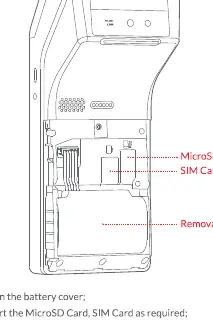
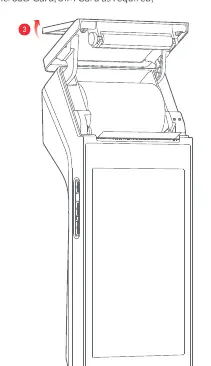
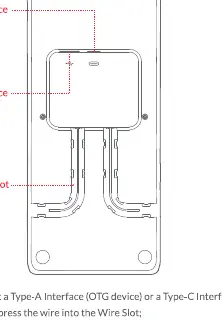
Printer Paper Loading: Unscrew the printer cover to open the paper compartment. Insert the thermal paper roll, ensuring it is oriented correctly (as shown in the diagram), and pull the end of the paper out through the exit before closing the cover.
Operation
Powering On/Off: Press and hold the power button for 2-3 seconds to power on or select power off/reboot. In standby status, press the button for 8 seconds to force power off.
Wi-Fi Setup: Go to Settings, turn on WLAN, and select your network from the list. Enter the access code if required.
Application Management: Use the Application Store to download apps. To uninstall, go to Settings, select Application, choose Management Application, and select Unloading.
Safety and Maintenance
- Environment: Use in a clean, dust-free environment. Avoid moisture, dampness, and extreme temperatures (0°C to +50°C operating).
- Handling: Do not disassemble, topple, throw, or bend the device.
- Emergency: If you detect unusual odor, overheating, or smoke, cut off the power immediately.
- Interference: This is a Grade B product; it may cause radio interference. Take measures to reduce interference with other electronic devices.
Practical help
Common problems
Device overheating, smoke, or unusual odor
Immediately cut off the power supply.
Radio interference with other devices
This is a Grade B product; take practical measures to reduce interference with radios, televisions, and medical equipment.
System instability or security risks
Do not breach the third-party ROM system or modify system files.
Before use
- Verify packing content: Device, Power Adapter, USB Cable, Printing Paper, User Manual.
- Ensure the environment is clean and dust-free to prevent clogging.
- Check that the power adapter is plugged into a compatible AC socket.
- Ensure the device is not used in explosive gas atmospheres.
- Check that the printer paper roll is oriented correctly.
Specs in practice
- Connectivity
- Supports 2G/3G/4G networks, Wi-Fi (802.11a/b/g/n/ac), and Bluetooth.
- Operating Temperature
- 0°C to +50°C; do not use in extreme cold or hot environments.
Images and diagrams
- Battery cover: Open to access SIM and MicroSD card slots.
- Printer compartment: Unscrew cover to load paper; ensure correct orientation.
- Charging: Connect via Type-C cable or use the optional charging base.
Model compatibility
- Supports MicroSD (TF) cards up to 64GB.
- Supports 58mm thermal paper rolls.
- Charging base is optional.

Manual page author
Emily Carter
User documentation editor
Prepares concise manual descriptions and highlights the most useful setup, operation, and maintenance information for readers.