Industrial / Kitchen Display Systems
Epson POS Menu Routing User Guide
Quick guide for configuring POS Menu Routing in the Epson TrueOrder Kitchen Display System. Learn how to route print jobs from your POS to specific display stations.
Table of contents
Manual images
Click an image to enlargeQuick guide from the manual
This document provides instructions for configuring the POS Menu Routing function within an Epson TrueOrder Kitchen Display System (KDS). This feature allows print jobs to be sent from a Point of Sale (POS) system directly to specific display stations over the network.
Overview
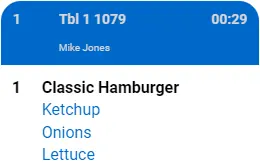
The POS Menu Routing function enables the POS system to determine which items are sent to which kitchen display stations. This ensures that menu management remains centralized on the POS, while print jobs are routed to the appropriate stations (e.g., Grill Station, Fry Station) based on the configuration.
How to Configure POS Menu Routing
This procedure assumes you have a Multi-Station setup as described in the Epson Multi-Station Quick Start Manual.
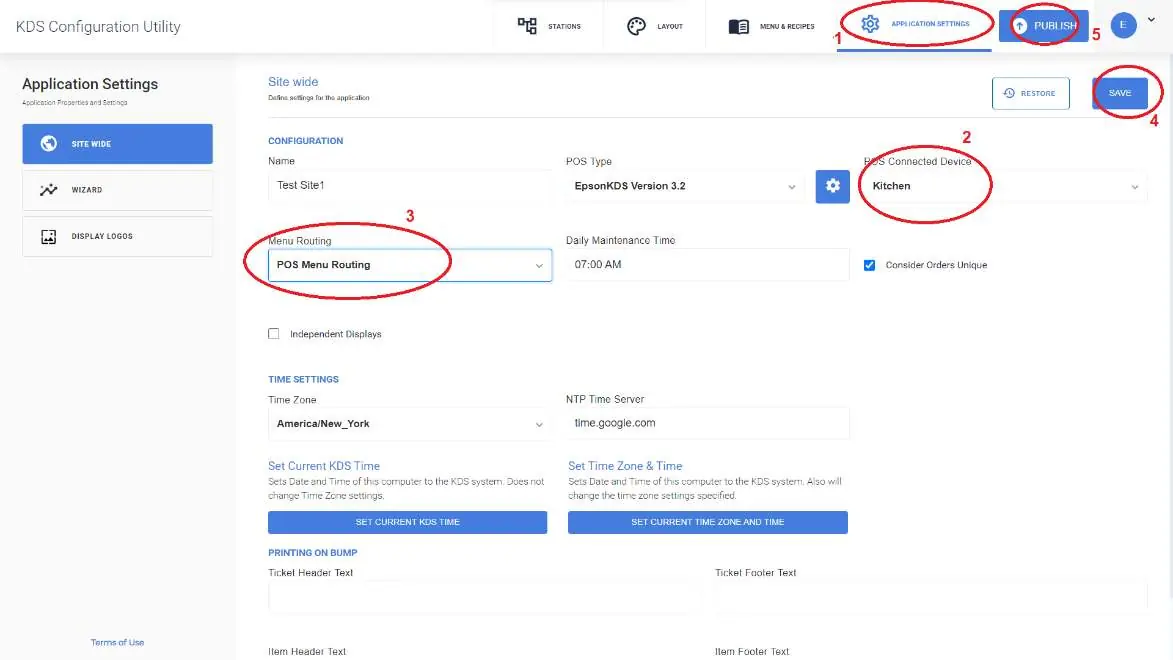
- Open the KDS Configuration Utility.
- Select Application Settings.
- Select POS Connected Device.
- Select POS Menu Routing.
- Click Save.
- Click Publish.
Important Notes
The POS system must be configured to send print jobs directly to the display stations. Please note that this configuration depends on the specific POS system being used and is not possible with all POS systems. Verify compatibility with your POS supplier.
Manufacturer information
Epson
Practical help
Common problems
Print jobs are not routing to the correct stations
Ensure your POS system is configured to send print jobs directly to the display stations. Not all POS systems support this feature.
Configuration options are missing in the utility
Verify that you are using a Multi-Station setup as described in the Epson Multi-Station Quick Start Manual.
Before use
- Ensure you have a Multi-Station KDS setup.
- Verify your POS system supports direct print job routing.
- Access the KDS Configuration Utility.
Images and diagrams
- The diagram illustrates how a single Point of Sale (POS) can route specific items (e.g., Hamburger to Grill Station, Fries to Fry Station) to different kitchen display stations over the network.
Model compatibility
- Requires a Multi-Station KDS setup.
- Functionality depends on the specific POS system capabilities.

Manual page author
Michael Turner
Technical manual editor
Reviews PDF manuals for structure, safety notes, and practical product details so readers can find the right information quickly.