Documents / Warranty Safety
INIU 10000mAh Power Bank BI-B41/BI-B1 User Manual
Comprehensive user guide for the INIU 10000mAh MegaPower Slim Portable Charger (models BI-B41 and BI-B1), covering charging, LED operation, and maintenance.
Table of contents
Product Overview
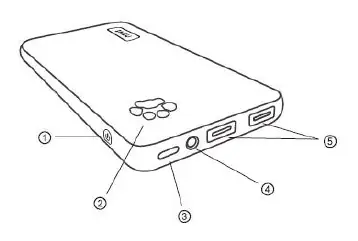
The INIU 10000mAh MegaPower Slim Portable Charger (models BI-B41 and BI-B1) is a compact and reliable power solution for your mobile devices. The device features a power button, a power indicator, a USB-C input/output port, a built-in LED light, and a USB-A output port. It is designed for portability and ease of use, ensuring your devices stay powered throughout the day.
How to Charge Your Phone
To charge your device, simply connect it to the power bank using a compatible USB cable. The charging process will start automatically. If charging does not begin, press the power button to restart the power bank. During the charging process, the last light of the battery indicator will blink until the device is fully charged. Please note that this power bank does not support QC, PD, or AFC fast charging protocols. The power bank will automatically turn off if it is not connected to a device for 35 seconds.
How to Recharge the Power Bank
To recharge the power bank, connect it to a power adapter using a USB-C cable. For optimal performance, it is recommended to use a 5V/2A adapter. The charging process will start automatically. During recharging, the battery indicator lights will flash consecutively until all five lights remain solid, indicating the unit is fully charged. A full recharge typically takes between 5 to 8 hours.
LED Light Operation
The power bank includes a built-in LED light for convenience. To turn the LED light on or off, press the power button twice in rapid succession.
Maintenance and Safety
To ensure the longevity of your power bank, please follow these guidelines:
- Use and recharge the power bank at least once every 6 months to preserve battery health.
- Do not drop, open, disassemble, or crush the device.
- Keep the power bank away from heat sources and liquids.
- Store the power bank in the provided protective pouch to prevent scratches.
The package may include a free USB light accessory. To use it, simply insert the light into the USB port; it should turn on automatically. If it does not, press the power button to restart the power bank.
Manufacturer information
INIU
Practical help
Common problems
Device does not start charging automatically
Press the power button once to restart the power bank.
USB light does not turn on
Ensure it is fully inserted into the USB port and press the power button to restart the bank.
Before use
- Ensure you have a compatible USB cable for your device.
- Use a 5V/2A adapter for the best recharging performance.
- Check that the power bank has sufficient charge indicated by the lights.
- Keep the device away from liquids and extreme heat.
Specs in practice
- Recharge Time
- Approximately 5-8 hours using a 5V/2A adapter.
Images and diagrams
- 1: Power Button
- 2: Power Indicator
- 3: USB-C Input & Output Port
- 5: USB-A Output Port
Model compatibility
- Does not support QC, PD, or AFC fast charging protocols.

Manual page author
David Miller
Documentation analyst
Organizes user manual content into clear summaries, with attention to model details, product context, and everyday usability.