Assembly Instructions for Invicta Interior 130CM Coffee Table
Quick assembly guide for the Invicta Interior 130CM coffee table. Includes parts list, step-by-step construction sequence, and hardware requirements.
Table of contents
Manual images
Jump to the sectionQuick guide from the manual
This document provides the necessary steps to assemble the Invicta Interior 130CM coffee table (Article No. 43344). Ensure you have all parts listed below before beginning assembly. It is recommended to assemble the table on a soft surface to prevent damage to the wood and glass.
Construction parts
- A1: Side frame (x02)
- A2: Crossbar (x01)
- A3: Support bar (x02)
- A4: Table top (x02)
- B1: M8*16 mm screws (x10)
- B2: M8*25 mm screws (x04)
- C: Washers (x14)
- D: M5 Allen key (x01)
Assembly steps
Follow these steps to construct the table:
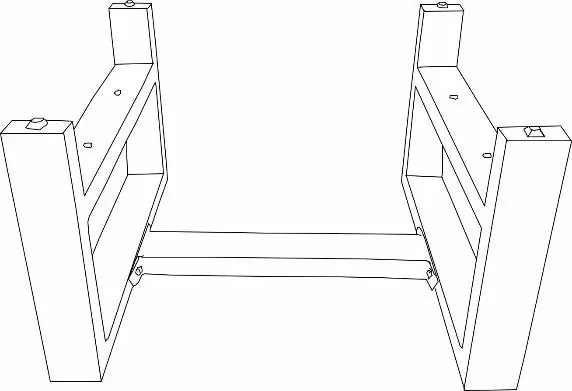
- Step 01: Connect the side frames (A1) using the crossbar (A2). Use screws (B1), washers (C), and the Allen key (D).
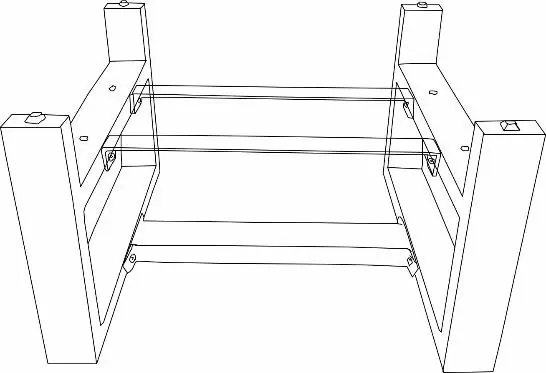
- Step 02: Attach the support bars (A3) to the side frames (A1) and crossbar (A2) using screws (B1), washers (C), and the Allen key (D).
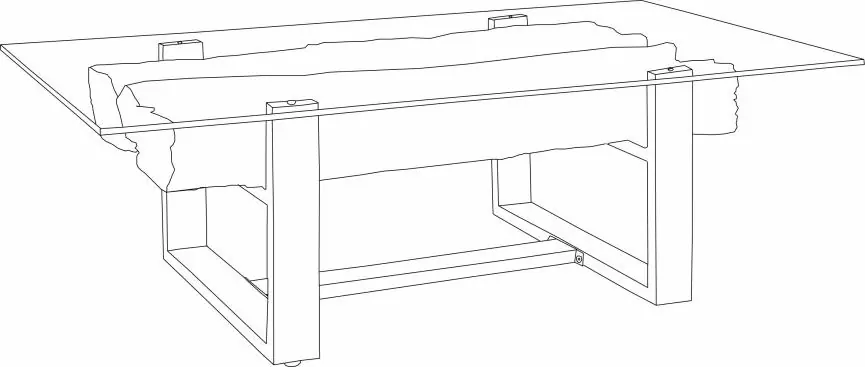
- Step 03: Place the table tops (A4) onto the frame. Secure them using screws (B2), washers (C), and the Allen key (D).
Contact information
If you have any questions regarding this article, please contact your dealer directly.
Manufacturer information
Invicta Interior GmbH & Co. KG
Practical help
Common problems
Verify all parts (A1-A4, B1-B2, C, D) are present before starting. Contact your dealer if any components are missing.
Do not fully tighten screws until all parts for a specific step are in place to allow for minor adjustments.
Before use
- Clear a workspace large enough for the table.
- Use a soft surface (like a rug or the shipping box) to protect the wood and glass.
- Identify all parts and hardware against the list provided.
- Ensure the M5 Allen key is available.

Manual page author
David Miller
Documentation analyst
Organizes user manual content into clear summaries, with attention to model details, product context, and everyday usability.