Electronics / Karaoke Systems
User Manual for Fresh 'n Rebel Kids Wireless Karaoke Set 1AKS100
Quick guide for the Fresh 'n Rebel Kids Wireless Karaoke Set 1AKS100. Learn how to connect via Bluetooth, use voice effects, charge the device, and understand technical specifications.
Quick answers from the manual
Quick answer
- The Fresh 'n Rebel 1AKS100 is a wireless karaoke set. To connect, turn on the speaker, enable Bluetooth on your device, and select 'Fresh 'n Rebel 1AKS100' from your Bluetooth settings. p. 2, 3
Key actions
- Pairing via Bluetooth p. 2, 3
First start
- Charge the device using the provided USB-C cable. Power on by holding the power button for 2 seconds. p. 2, 3
Problems and fixes
Device powers off automatically
The speaker automatically powers off after 10 minutes without connection or activity.
p. 6Technical specifications
| Parameter | Value | Meaning | Pages |
|---|---|---|---|
| Speaker Play Time | 12 hours | At 50% volume | p. 6 |
| Microphone Play Time | 15 hours | At 50% volume | p. 6 |
Where to find it in the PDF
- Charging and Connection p. 2, 3
- Button Controls p. 5
- Specifications p. 6
Table of contents
Manual images
Click an image to enlargeQuick guide from the manual
The Fresh 'n Rebel Kids Wireless Karaoke Set 1AKS100 is designed for wireless audio playback and karaoke. This guide covers the essential steps for charging, connecting, and operating the device.
Getting Started
Before using the device for the first time, ensure both the speaker and the microphone are fully charged using the provided USB-C cables. The speaker takes approximately 2 hours to charge, while the microphone takes 1 hour.
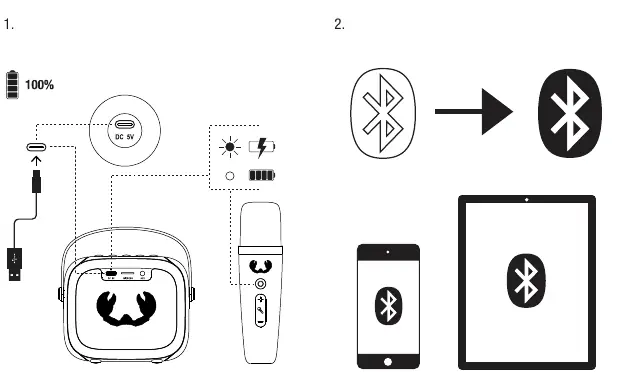
Bluetooth Connection
To connect your device:
- Ensure the speaker is powered on.
- Enable Bluetooth on your smartphone or tablet.
- Search for and select 'Fresh 'n Rebel 1AKS100' in your device's Bluetooth settings to pair.
Button Controls
The device features intuitive controls for playback and voice customization:
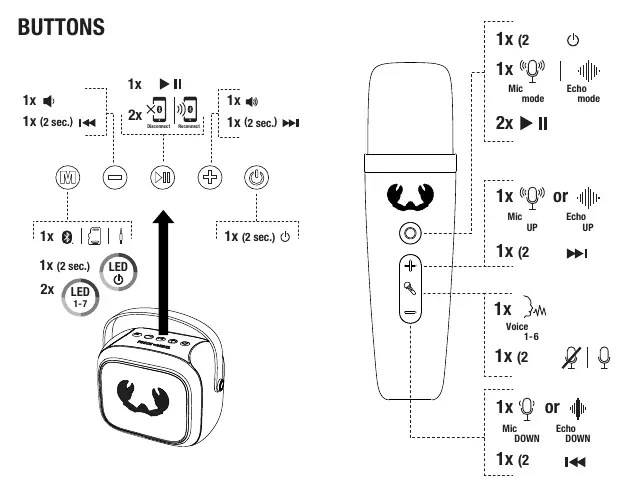
- Speaker Buttons: Control volume, play/pause, and Bluetooth disconnection/reconnection.
- Microphone Buttons: Adjust microphone volume, echo levels, and select from 6 different voice effects.
Ports and Inputs
The speaker is equipped with:
- USB-C Port: For charging.
- Micro SD Slot: For data input.
- Aux Input: 3.5mm jack for wired connections.
Technical Specifications
The system includes a wireless speaker and wireless microphones with the following key features:
- Speaker: Bluetooth 5.3, 12-hour play time (at 50% volume), 5W RMS power.
- Microphone: 2.4 GHz wireless connection, 15-hour play time (at 50% volume), 6 voice effect modes.
- Auto-off: The speaker automatically powers off after 10 minutes of inactivity.
Safety and Disposal
Always follow safety instructions. Do not disassemble or modify the device. The product contains rechargeable lithium batteries; do not attempt to replace them yourself. Dispose of the device at an approved recycling center to prevent environmental pollution.
Practical help
Common problems
Device not connecting via Bluetooth
Ensure the speaker is in pairing mode and Bluetooth is enabled on your source device. Select 'Fresh 'n Rebel 1AKS100' from the list.
No sound output
Check that the volume is turned up on both the speaker/microphone and the connected playback device.
Before use
- Charge the speaker fully (2 hours).
- Charge the microphone fully (1 hour).
- Ensure the device is within 10 meters of the audio source.
- Check that the Bluetooth is enabled on your phone or tablet.
Specs in practice
- Bluetooth 5.3
- Provides a stable and efficient wireless connection.
- Voice effects
- The microphone supports 6 different voice effect modes for karaoke.
Images and diagrams
- Page 2 illustrates the charging process and Bluetooth pairing steps.
- Page 5 provides a detailed map of button functions for both the speaker and the microphone.
Model compatibility
- Compatible with Bluetooth-enabled devices.
- Supports Micro SD cards for data input.
- Includes 3.5mm Aux input for wired audio.

Manual page author
Michael Turner
Technical manual editor
Reviews PDF manuals for structure, safety notes, and practical product details so readers can find the right information quickly.