Electronics / Speakers & Soundbars
Rockville SINGMIX 5 V2 Karaoke Receiver Owner's Manual
Comprehensive user guide for the Rockville SINGMIX 5 V2 Karaoke Receiver. Includes setup instructions, speaker configuration, Bluetooth pairing, USB playback, microphone settings, and troubleshooting steps.
Quick answers from the manual
Quick answer
- To pair Bluetooth, set the mode to 'bLUE' using the Mode button, search for 'SINGMIX 5 V2' on your device, and select it. p. 3
Key actions
- Pairing Bluetooth p. 3
- Replacing the fuse p. 8
First start
- Connect speakers (min 4 ohms), plug in power, and select input mode. p. 3, 5
Problems and fixes
No power
Check power connection and fuse.
p. 8
Bluetooth pairing fails
Ensure device is discoverable and within 5ft.
p. 8Technical specifications
| Parameter | Value | Meaning | Pages |
|---|---|---|---|
| RMS Power | 600W | 600 Watts RMS @ 4 Ohm | p. 7 |
| Peak Power | 2000W | 2,000 Watts Peak @ 4 Ohm | p. 7 |
Where to find it in the PDF
- Front Panel Functions p. 2, 3
- Setup and Connections p. 4, 5
Table of contents
Manual images
Click an image to enlargeQuick guide from the manual
The Rockville SINGMIX 5 V2 is a professional karaoke receiver. This guide provides essential information for setup, operation, and maintenance. Always ensure the unit is placed in a well-ventilated area and never block the exhaust fan. Before connecting speakers, verify that the total impedance is not less than 4 ohms.
Safety Instructions
- Never open the unit; there are no user-serviceable parts inside.
- Do not place the unit near heat sources, direct sunlight, or moisture.
- Ensure the unit is situated in a properly ventilated area.
- Do not place objects on top of the unit to avoid blocking vents and overheating.
Front Panel and Remote Functions
The front panel features controls for Master Volume, Microphone Volume, Echo, Mic EQ, and Equalizer settings. The input selector allows switching between USB, Bluetooth, FM, Coaxial/Optical, and Auxiliary modes.
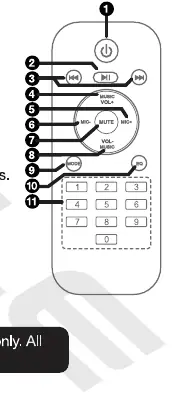
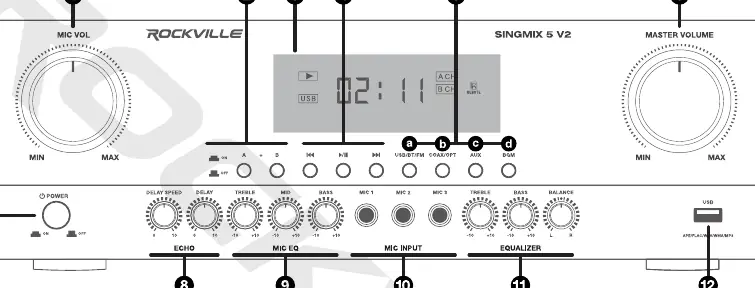
The remote control provides quick access to power, mode selection, volume control, track navigation, and EQ presets (POP, ROCK, FLAT, CLASSIC, COUNTRY, OFF).
Bluetooth and USB Operation
Bluetooth Pairing:
- Turn on the Bluetooth feature on your device and ensure it is in "discoverable" mode.
- Press the Mode key on the unit or remote until the display reads "bLUE".
- Search for "SINGMIX 5 V2" on your device and select it.
- The word "bLUE" will stop flashing once pairing is successful.
USB Playback:
- Connect a USB drive to the front panel port. The unit will automatically begin playback.
- Supported formats: MP3, WMA, WAV, FLAC, and APE.
- USB drives should be formatted in FAT32.
FM Radio
- Press the Mode key to enter FM mode.
- Long press the Play/Pause button on the remote to initiate auto-scan and store stations.
- Use the Previous/Next buttons to navigate through preset stations.
Speaker Setup and Configuration
The receiver features two zones: Channel A and Channel B. The minimum speaker impedance is 4 ohms. Do not connect speakers with a total impedance lower than 4 ohms per channel.
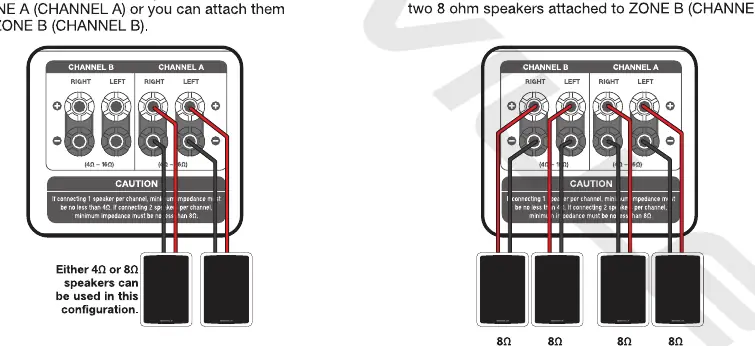
- Zone A and B: You can connect speakers to either zone or both.
- Configuration: Ensure wiring is correct for parallel connections as indicated in the rear panel diagrams.
Microphone and Echo Settings
Connect wired microphones to the 1/4" inputs. Use the front panel knobs to adjust:
- Echo: Adds decaying echoes to the sound. Adjust Delay and Delay Speed to change the room's sound characteristics.
- Mic EQ: Independently control treble, mid, and bass levels for all microphone inputs.
Fuse Replacement
If the unit has no power, check the fuse located near the AC input socket.
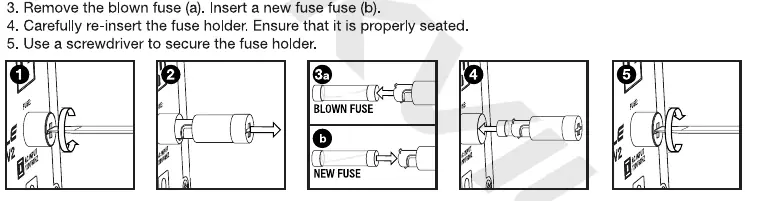
- Use a screwdriver to release the fuse holder.
- Remove the holder and the blown fuse.
- Insert a new fuse of the same value (250V/8A).
- Re-insert the holder and secure it.
Troubleshooting
If you encounter issues, check the following:
- No Power: Ensure the unit is plugged in and the fuse is intact.
- Bluetooth Fails: Ensure the device is discoverable, within 5ft of the receiver, and not paired to another device.
- No Sound: Verify the correct input source, check volume levels, and ensure all connections are secure. If using optical input, set TV audio to PCM.
- Microphone Feedback: Move speakers away from microphones and adjust the treble on the Mic EQ panel.
Manufacturer information
Rockville
Practical help
Common problems
No power
Check if the unit is properly plugged in and inspect the fuse.
Bluetooth pairing fails
Ensure the device is discoverable, within 5ft of the unit, and not paired to another device.
No sound
Check input source selection, volume levels, and all cable connections. If using optical, set TV to PCM.
Microphone feedback
Move speakers away from the microphone area and reduce treble on the Mic EQ panel.
Before use
- Ensure the unit is in a well-ventilated area.
- Do not block the exhaust fan.
- Verify speaker impedance is at least 4 ohms.
- Ensure the correct input mode is selected.
- Check that the fuse is intact if the unit does not power on.
Specs in practice
- Frequency Response
- 20Hz - 20kHz ±2dB.
- Speaker Impedance
- Minimum 4 ohms required.
Images and diagrams
- Front panel controls volume, echo, mic EQ, and input selection.
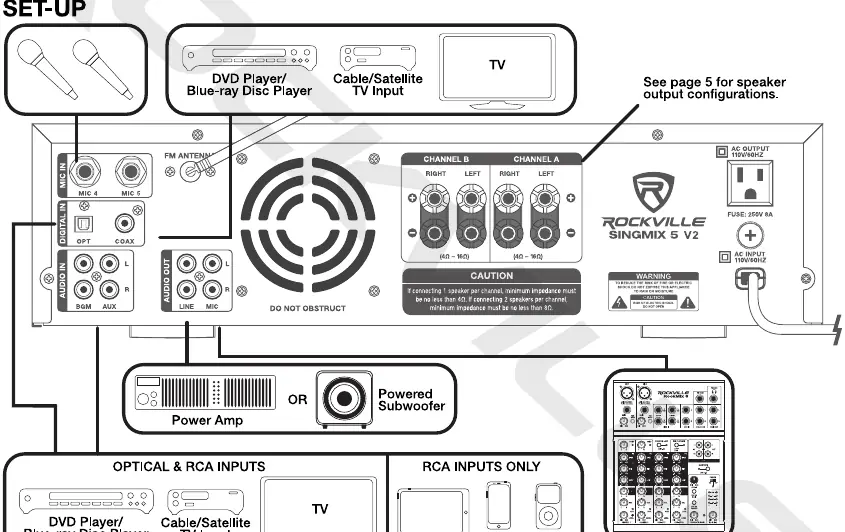
- Rear panel contains speaker outputs, mic inputs, and line inputs/outputs.
- Fuse holder is located next to the AC power input.
Model compatibility
- Supports USB drives formatted in FAT32.
- Compatible with MP3, WMA, WAV, FLAC, and APE files.
- Speaker impedance must not be less than 4 ohms.

Manual page author
Michael Turner
Technical manual editor
Reviews PDF manuals for structure, safety notes, and practical product details so readers can find the right information quickly.