Electronics / Speakers & Soundbars
User Manual for Pronomic MOVE 112MA-A and 115MA-A Active Speaker
Quick guide for Pronomic MOVE 112MA-A and 115MA-A battery-powered active speakers. Includes setup, Bluetooth pairing, TWS connection, wireless microphone usage, and technical specifications.
Table of contents
Manual images
Click an image to enlargeQuick guide from the manual
This manual provides instructions for the Pronomic MOVE 112MA-A and 115MA-A battery-powered active speaker systems. Before using the device, ensure it is placed on a stable surface and the volume is set to the lowest level. Always disconnect the unit from the mains when not in use or during a thunderstorm. Do not operate the speaker with overload to avoid damage.
Operation and connections
The rear panel of the loudspeaker module features various inputs and controls:
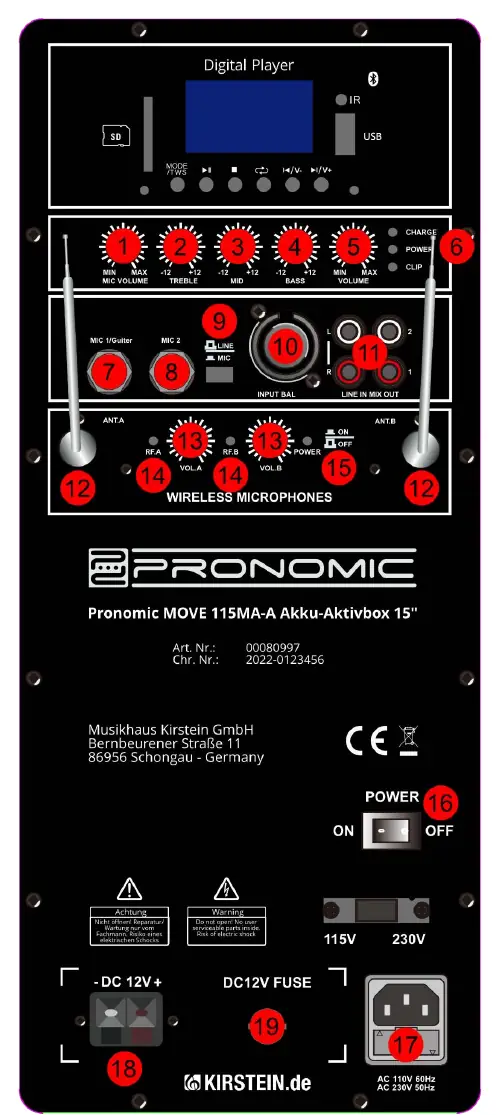
- Microphone/Guitar Inputs: Use the 6.3mm jack inputs (7, 8) or the XLR input (10) for microphones or instruments. Use the Line/Mic switch (9) to select the appropriate signal type.
- Cinch Input/Output: Use the RCA (cinch) connectors (11) to connect external devices like CD players or mixers. The MIX-OUT provides an unbalanced stereo signal to external devices.
- Sound Controls: Adjust the sound using the dedicated rotary controls for Treble (2), Middle (3), Bass (4), and overall Volume (5).
- LED Indicators: Monitor the status via the Charge, Power, and Clip LEDs (6). If the Clip LED lights up, reduce the volume immediately.
Bluetooth and Digital Player
The integrated digital player allows playback from USB sticks or SD cards, as well as Bluetooth streaming.
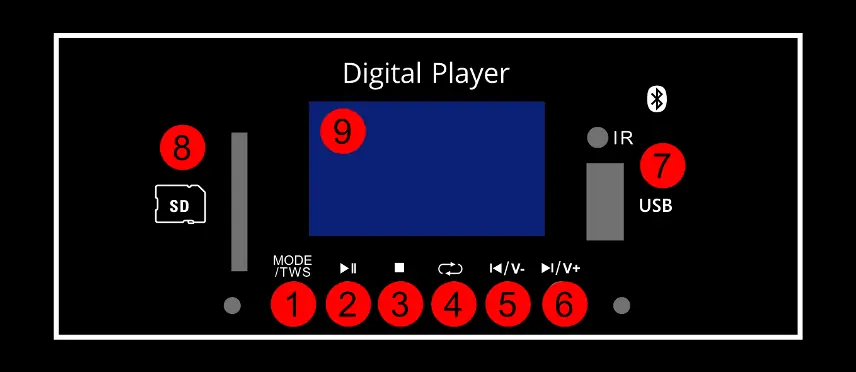
- Bluetooth Pairing: Press the MODE button on the player to select Bluetooth mode. Activate Bluetooth on your mobile device and connect to the speaker.
- Playback Controls: Use the Play/Pause, Stop, Repeat, and track navigation buttons (Previous/Next) to control your audio.
- Volume: Press and hold the Previous or Next buttons to adjust the volume.
Wireless Microphones
To use the wireless microphones or headset:
- Insert a battery into the transmitter/body pack.
- Connect the headset cable to the body pack if using a headset.
- Switch on the body pack.
- Adjust the volume using the wireless microphone volume controls (13) on the main panel.
- Point the antennas (12) in any direction to improve reception.
TWS Function
You can connect two Pronomic MOVE speakers wirelessly using the TWS (True Wireless Stereo) function:
- Press the MODE button on both speakers to activate Bluetooth mode.
- Press and hold the MODE / TWS button on both units to enter TWS mode.
- Wait for the connection tone indicating the speakers are paired.
- Connect your Bluetooth device to one of the speakers; audio will play through both.
- Long press the MODE / TWS button again to disconnect the units.
Technical Specifications
The speakers feature a rechargeable lead battery (12V, 4500mA). The 112MA-A model includes a 12" woofer, while the 115MA-A includes a 15" woofer. Both models offer 60W Peak and 30W RMS power, Bluetooth 5.0 connectivity, and a frequency range of 50Hz-18KHz (115MA-A) or 55Hz-18KHz (112MA-A).
Manufacturer information
Musikhaus Kirstein
Practical help
Common problems
Clip LED lights up
Turn down the volume immediately to prevent damage to the unit.
No sound from Bluetooth
Ensure the MODE button has been pressed to select Bluetooth mode on the player.
Battery not charging
Ensure the unit is connected to a mains socket or an external 12V DC source.
Before use
- Check the item for possible damage before putting it into operation.
- Turn the volume control to the lowest setting before switching on.
- Ensure the installation is on a stable and solid surface.
- Connect the mains cable to the appliance first, then to the socket.
- Ensure children are supervised and do not play with the appliance.
Specs in practice
- Bluetooth version
- 5.0 - The wireless connectivity standard supported.
- Microphone input level
- < 5mV - Sensitivity for microphone inputs.
Images and diagrams
- The rear panel contains controls for Mic volume, Treble, Middle, Bass, and Master volume.
- Inputs include XLR, 6.35mm jack, and RCA (cinch) for various audio sources.
- The digital player section manages USB, SD card, and Bluetooth playback.
Model compatibility
- Compatible with external 12V DC sources for charging.
- Wireless microphone frequency range: 863-865MHz.

Manual page author
David Miller
Documentation analyst
Organizes user manual content into clear summaries, with attention to model details, product context, and everyday usability.