Electronics / Speakers & Soundbars
User Manual for Pronomic MOVE 112MA-A / 115MA-A Battery-Powered Active Box
Comprehensive user guide for the Pronomic MOVE 112MA-A and 115MA-A battery-powered active speakers. Includes setup instructions, Bluetooth pairing, TWS connection, wireless microphone usage, digital player operation, and technical...
Table of contents
Manual images
Click an image to enlargeQuick Guide and Safety Information
The Pronomic MOVE 112MA-A and 115MA-A are battery-powered active loudspeaker systems. To ensure safe and optimal operation, please observe the following:
- Safety First: Always turn the volume control to the lowest setting before switching the unit on.
- Placement: Operate only on a stable, solid surface to prevent tipping.
- Power: Use only an earthed mains socket. Disconnect during thunderstorms or when not in use.
- Overload Protection: If the 'Clip' LED lights up, reduce the volume immediately to prevent damage to the speakers.
- Maintenance: The unit contains no user-serviceable parts. Have fuses checked or replaced only by trained personnel.
Technical Specifications
The system is available in two sizes (12" and 15"). Key specifications include:
- Power: 60W Peak / 30W RMS.
- Battery: Rechargeable, spill-proof lead battery (12V, 4500mA).
- Connections: XLR, 2x 6.35mm jack, 2x Cinch (RCA).
- Bluetooth: Version 5.0.
- Wireless Microphone Frequency: 863-865MHz.
Operation and Connections
The rear panel contains all controls and inputs:
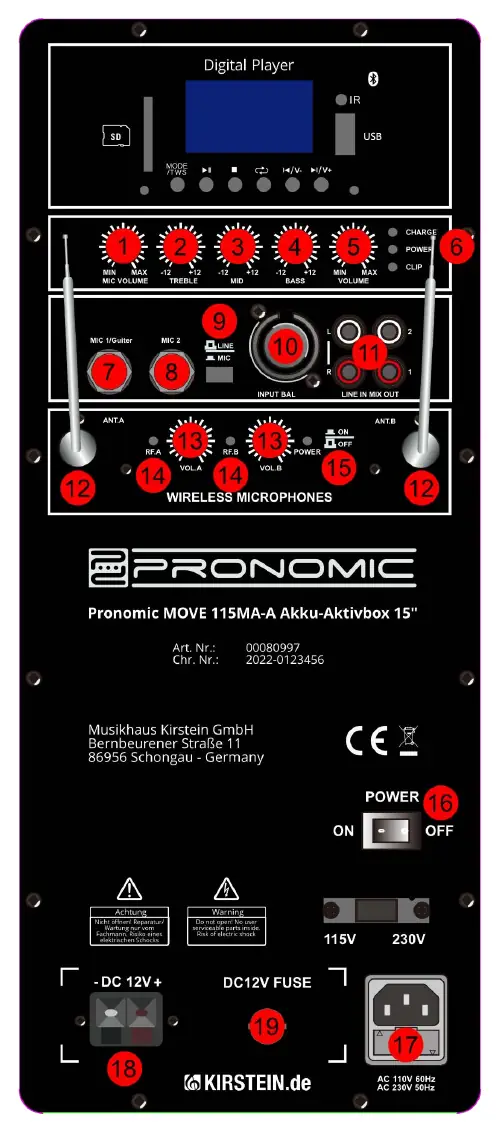
- Microphone/Guitar Inputs: Use inputs 7, 8, or 10 for microphones or instruments. Use the Line/Mic switch (9) to select the appropriate signal type.
- Volume Controls: Separate controls are provided for Microphone volume (1), Wireless Microphone volume (13), and Master Volume (5).
- Tone Controls: Adjust Treble (2), Middle (3), and Bass (4) to shape the sound.
- LED Indicators: Monitor Charge, Power, and Clip status (6).
- Powering: Use the Mains switch (16) to turn the system on or off.
Bluetooth and TWS Function
Bluetooth Pairing:
- Press the MODE button on the MP3 player to select Bluetooth mode.
- Activate Bluetooth on your mobile device and connect to the speaker (112MA-A or 115MA-A).
- Future connections will pair automatically when the speaker is in Bluetooth mode.
TWS (True Wireless Stereo) Function:
- Switch both speakers to Bluetooth mode.
- Press and hold the MODE/TWS button on both units.
- A connection tone will sound when they are paired.
- Connect your Bluetooth device to the 'master' speaker; audio will play through both.
Using Wireless Microphones
- Insert batteries into the transmitter/body pack.
- Connect the headset cable to the body pack if using a headset.
- Switch on the body pack.
- Adjust the volume using the Wireless Microphone volume controls (13).
- Position the antennas (12) for optimal reception.
Digital Player Functions
The integrated player supports USB and SD card playback:
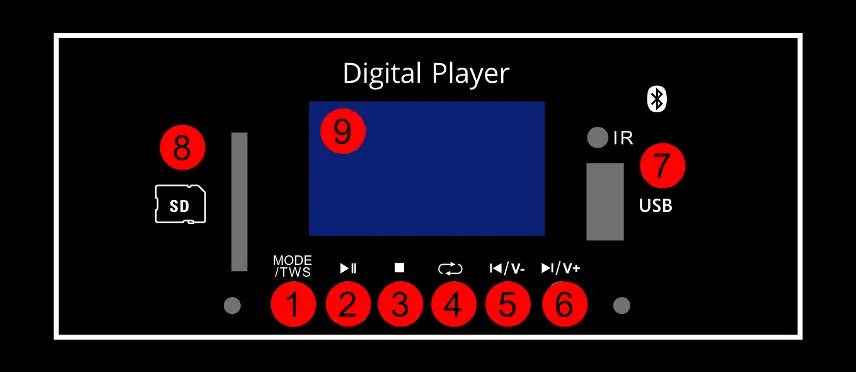
- MODE/TWS: Switch between USB, SD, and Bluetooth.
- Playback Controls: Play/Pause, Stop, Repeat, and Track navigation (Previous/Next).
- Volume: Press and hold Previous/Next buttons to adjust volume.
Manufacturer information
Musikhaus Kirstein
Practical help
Common problems
Clip LED is lit
The signal strength is too high. Reduce the volume immediately to prevent damage to the unit.
TWS connection fails
Ensure both speakers are in Bluetooth mode before pressing and holding the MODE/TWS button on both units.
No sound from wireless microphone
Check that the body pack is switched on, batteries are inserted, and the wireless microphone volume control (13) is turned up.
Before use
- Inspect the unit for any physical damage.
- Ensure the speaker is placed on a stable, solid surface.
- Turn the volume control to the minimum setting before switching on.
- Connect the power cable to an earthed mains socket if charging.
- Check that the fuse is intact.
Specs in practice
- Crossover frequency
- The frequency at which the signal is split between the woofer and tweeter (2.5 KHz).
Images and diagrams
- The rear panel features 19 numbered controls and inputs, including volume, EQ, microphone inputs, and power management.
- The digital player section (top of the panel) includes SD/USB slots and playback controls.
Model compatibility
- Wireless microphone frequency range is 863-865MHz.
- Supports external 12V DC charging sources (e.g., car batteries).

Manual page author
Emily Carter
User documentation editor
Prepares concise manual descriptions and highlights the most useful setup, operation, and maintenance information for readers.