Documents / Warranty Safety
User Guide for KOAMTAC 0.5W UHF Reader Companion
Quick guide for the KOAMTAC 0.5W UHF Reader Companion, covering setup, UHF mode switching, reading modes, and technical specifications for KDC and SKX SmartSled models.
Table of contents
Manual images
Jump to the sectionQuick guide from the manual
This document provides essential instructions for the KOAMTAC 0.5W UHF Reader Companion. It covers initial setup, switching between Barcode and UHF modes, selecting specific UHF reading modes, and technical specifications for various SmartSled models.
Device Setup
To power on the device, attach the UHF Reader to your SmartSled. For KDC1000/1100 and SKX series, the device powers on automatically when the phone is inserted. For KDC480/485, press the SCAN and DOWN buttons for 3 seconds. Successful installation is confirmed by a beep sequence upon boot-up.

Connectivity
The device connects to a host via USB, Serial, or Bluetooth. Communication can be one-way (HID/USB HID) or two-way (SPP/Serial). Two-way connections may require KTSync or a custom application using the KOAMTAC SDK.
Operating Modes
The device operates in either Barcode Mode or UHF Mode. You can toggle between these modes using specific button sequences or via the KTSync application. In UHF Mode, you can further cycle between three reading modes: Active (default), Single, and Multiple. Each mode is confirmed by a specific number of beeps.
Reading UHF Tags
To scan, point the UHF antenna side toward the RFID tag. A single beep indicates a successful read, while multiple beeps indicate an unsuccessful attempt. Always maintain at least 8 inches (20 cm) between the reader and your body during operation.
Software and SDK
KTSync software supports data collection and configuration. For custom development, the KOAMTAC SDK is available. The KDCUHF app for iOS and Android allows for performance testing and advanced configuration of tag parameters and reading modes.
Technical Specifications
- Standards: EPC Class1 Gen2, EPC Gen2 V2
- Read Range: Up to 5 feet (1.5 m)
- Read Rate: 100 tags per second
- Storage: Over 400,000 RFID tags
- Ingress Protection: IP65
- Operating Temperature: -4°F to 122°F (-20°C to 50°C)
Practical help
Common problems
No detection beeps on boot-up
The UHF Reader may not be installed properly. Verify the physical installation on the SmartSled.
Multiple beeps after scanning
This indicates an unsuccessful read. Ensure the UHF antenna is pointed directly toward the RFID tag.
Device switches to Barcode Mode automatically
In Active Mode, holding the SCAN button for over 10 minutes triggers an automatic switch to Barcode Mode to save battery.
Before use
- Read the Quick Guide and Reference Guide thoroughly.
- Ensure the reader is securely attached to the SmartSled.
- Verify the device is in the correct mode (Barcode or UHF).
- Ensure the UHF antenna is pointed toward the tags, not your body.
- Maintain a distance of at least 8 inches (20 cm) from your body.
Specs in practice
- Output Power
- Adjustable range from 0 to +27 dBm (varies by region) to control read range and power consumption.
Images and diagrams
- The manual provides specific button sequences for toggling modes on different models.
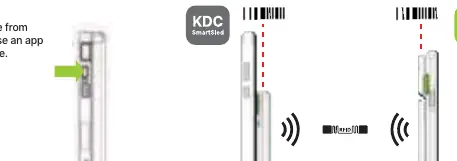
- Special barcodes are provided for entering UHF mode when button sequences are not used.
- The manual illustrates the physical orientation of the scan engine versus the UHF antenna.
Model compatibility
- Compatible with KDC1000/1100, KDC480/485, and SKX SmartSled platforms.
- KTSync is compatible with iOS, Android, Windows, and Mac.
- SDK supports Android, iOS, Windows, Web, Xamarin, Cordova, React Native, and Flutter.

Manual page author
David Miller
Documentation analyst
Organizes user manual content into clear summaries, with attention to model details, product context, and everyday usability.