User Manual for KRUX ARM 200L / ARM 200S Microphone Arm
Quick guide for the KRUX ARM 200L and ARM 200S boom arms. Includes mounting instructions, technical specifications, movement ranges, and thread adapter compatibility.
Quick answers from the manual
Quick answer
- The KRUX ARM 200L/200S is a spring-loaded boom arm for microphones and cameras, featuring a desk clamp mount, adjustable reach, and multiple thread adapters. p. 1, 2, 3
Key actions
- Mount the arm to the desk using the clamp. p. 2
- Attach the appropriate thread adapter for your device. p. 3
Technical specifications
| Parameter | Value | Meaning | Pages |
|---|---|---|---|
| Max weight | 1300 g | Maximum load capacity | p. 2 |
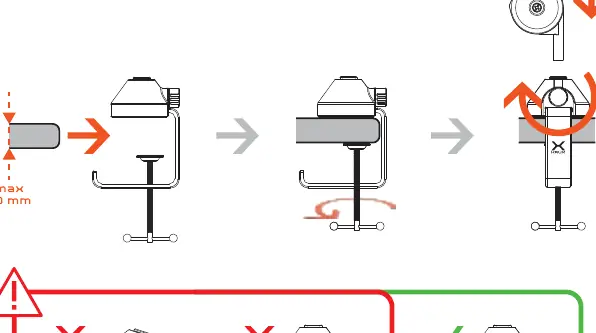
| Desk thickness | Max 70 mm | Maximum clamp opening | p. 2 |
Where to find it in the PDF
- Front page p. 1
- Mounting and Specs p. 2
- Adjustments and Adapters p. 3
- Warranty p. 4
Table of contents
Manual images
Click an image to enlargeQuick guide from the manual
Warning: The arm is spring-loaded. Exercise caution when handling to avoid injury or damage.
Mounting
The arm is designed to be mounted to a desk using the included clamp. Ensure the desk thickness does not exceed 70 mm. Follow the visual guide to secure the clamp properly to the edge of the desk.
Technical Specifications
- KRXH002 (ARM 200L): Horizontal reach 1100 mm, Vertical reach 760 mm, Cable 2.9 m.
- KRXH003 (ARM 200S): Horizontal reach 1000 mm, Vertical reach 710 mm, Cable 2.2 m.
- Max weight supported: 1300 g.
- Base width: 72 mm.
Arm Adjustments
The arm features multiple points of articulation for optimal positioning:
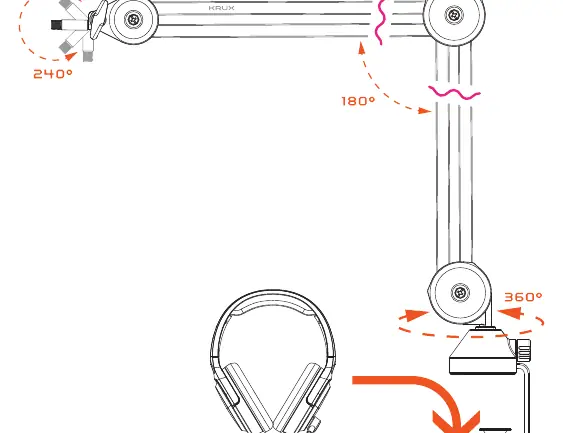
- Top joint: 240° rotation
- Middle joint: 180° rotation
- Base joint: 360° rotation
Thread Adapters
The arm includes adapters to support various devices such as microphones and cameras:
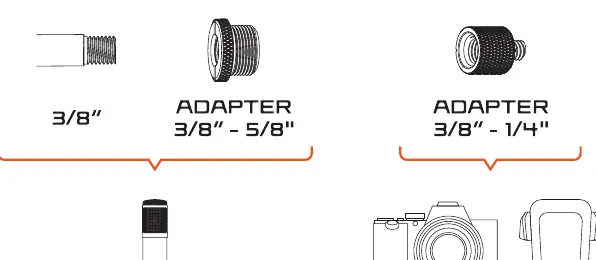
- 3/8" (standard)
- 3/8" - 5/8" adapter
- 3/8" - 1/4" adapter
Practical help
Common problems
The arm is spring-loaded; ensure it is properly mounted and balanced with the weight of the device.
Ensure the desk thickness is within the maximum limit of 70 mm.
Before use
- Check desk thickness (max 70 mm)
- Ensure the clamp is tightened securely
- Select the correct thread adapter for your device (3/8", 5/8", or 1/4")
- Verify the device weight is under 1300 g

Manual page author
Emily Carter
User documentation editor
Prepares concise manual descriptions and highlights the most useful setup, operation, and maintenance information for readers.