Tools / Saws
User Manual for Laguna Pressure-Flo Pond Filter
Quick guide for the Laguna Pressure-Flo pond filter. Learn about installation, backwash cleaning, UVC lamp replacement, and maintenance procedures for your pond filtration system.
Table of contents
Manual images
Click an image to enlargeQuick guide from the manual
The Laguna Pressure-Flo is a pressurized pond filter with an integrated UVC clarifier. It provides mechanical and biological filtration for outdoor freshwater ornamental ponds. The system includes a backwash cleaning feature to maintain performance without opening the unit.
Installation
Place the filter on a firm, level base, at least 1 meter from the pond edge. Ensure it is protected from direct sunlight and flooding. The filter can be placed above ground or buried with the lid clamp at least 5 cm above ground level.
Connect three hoses: one for the inlet (from the pump), one for the outlet (to the pond), and one for the drain (for backwash). Use the provided universal click-fit couplings for easy connection.
Start-up and Operation
Before the first start-up, install the lid O-ring in its seat. Ensure the biological media is placed in the filter case (except for 1000/3000 models). Secure the lid with the clamp and safety lock. Turn on the pump first, then plug in the UVC lamp.
Backwash-Cleaning System
When the cleaning indicator shows the filter is clogged, perform a backwash:
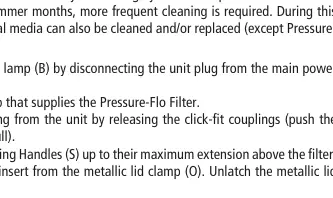
- Turn off the pump.
- Remove the sealing cap from the drain outlet and connect a drain hose.
- Set the mode selector switch to "Drain Mode".
- Turn on the pump.
- Slide the cleaning handles up and down for several minutes until the water runs clear.
- Turn off the pump, return the switch to "Filtering Mode", and replace the sealing cap.
Cleaning and Maintenance
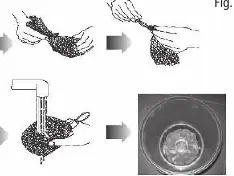
For thorough cleaning, switch off the UVC lamp and the pump. Disconnect the hoses and remove the lid. Remove the foam filters and rinse them with pond water. Clean the biological media if necessary. Inspect and clean the cleaning blades and guide rods.
UVC Lamp and Quartz Sleeve
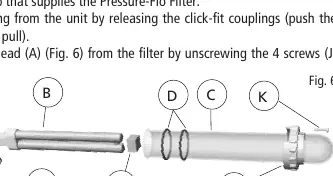
Replace the UVC lamp annually. To clean the quartz sleeve, remove the UVC head, unscrew the retaining flange, and carefully remove the sleeve. Wipe with a soft cloth and vinegar if necessary. Do not use detergents.
Winter Storage
Protect the unit from frost. Switch off, drain all water, and store in a dry, weather-proof area. Keep the lid open during storage.
Manufacturer information
Laguna Ponds
Practical help
Common problems
Filter remains clogged after backwash
Perform a full cleaning of the foam filters and biological media.
Water leakage
Check that all O-rings are correctly seated and not damaged. Ensure the lid clamp is securely locked.
UVC lamp not working
Check power connection. If the lamp is old, replace it. Ensure the quartz sleeve is clean.
Before use
- Check quartz sleeve and UVC lamp for damage.
- Install the lid O-ring in its seat.
- Ensure biological media is placed in the filter case.
- Verify all hose connections are secure.
- Perform the Filter Wet Test before connecting to power.
Specs in practice
- Max Operating Pressure
- 0.04 MPa (0.4 bar or 5.8 PSI). Do not connect to public water works.
- Water Temperature
- Suitable for use in water temperatures from 4°C to 35°C.
Images and diagrams
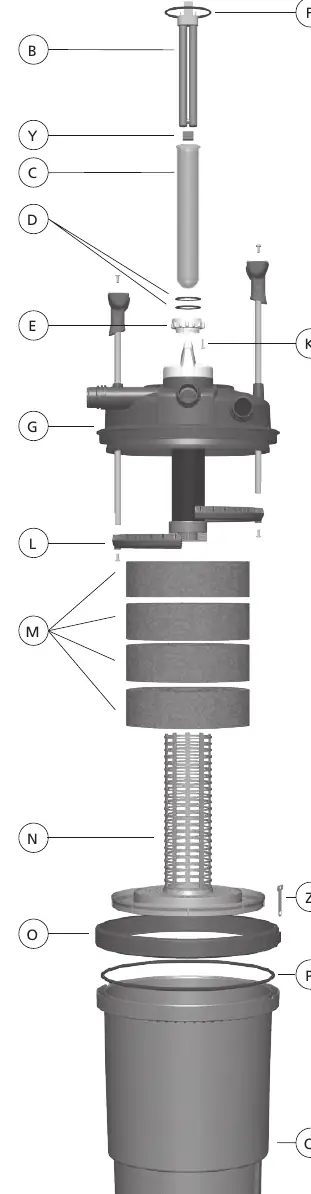
- C: Quartz Sleeve
- G: Filter Lid
- M: Foam Filters
- Q: Filter Case
Model compatibility
- For freshwater use only.
- Not a submersible product.
- Requires a solids handling pump (e.g., Laguna Max-Flo).

Manual page author
Michael Turner
Technical manual editor
Reviews PDF manuals for structure, safety notes, and practical product details so readers can find the right information quickly.