Computers / Laptops
LG 17MB15T-B Touch Screen Monitor Quick Start Guide
Quick start guide for the LG 17MB15T-B LED LCD touch screen monitor, covering setup, connection, and safety recommendations.
Table of contents
Product Overview
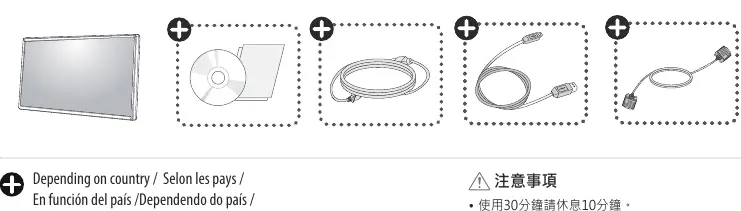
The LG 17MB15T-B is an LED LCD touch screen monitor designed for reliable performance. To ensure the device functions correctly and to prevent potential malfunctions, it is essential to use only the components and cables supplied with the product.
Setup and Connection
Proper installation is critical for the monitor to operate as intended. Follow these steps for initial setup:
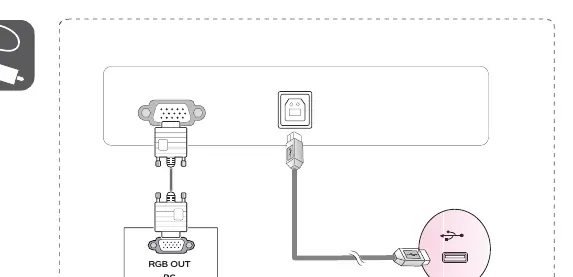
- Ensure all supplied cables are used during installation. Using third-party or incompatible cables may result in image noise, display issues, or device failure.
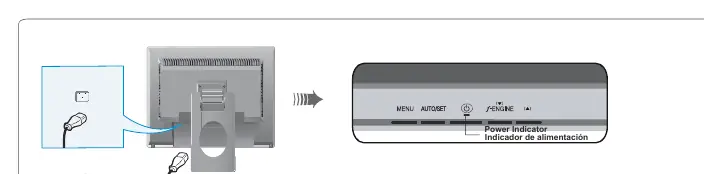
- Connect the power cable to the monitor and a grounded power outlet.
- Connect the necessary video signal cables (such as RGB) from your PC to the monitor.
- The monitor features a power indicator light to confirm it is receiving power and is operational.
Safety and Usage Guidelines
To maintain eye health and ensure safe operation, please adhere to the following recommendations:
- Take a 10-minute break after every 30 minutes of screen use.
- Children under 2 years of age should not be exposed to screen time. For children over 2 years, limit screen time to no more than 1 hour per day.
- Excessive use of the monitor may cause eye strain or vision damage.
Support and Maintenance
If you encounter issues with your monitor, please refer to the official LG website to download the full user manual and troubleshooting guides. Always ensure the monitor is placed on a stable surface and kept away from extreme environmental conditions to prolong its lifespan.
Related manuals
Related manuals from the same brand or category.
Computers / Laptops
LG 16T90R Series Notebook User Guide
LGComputers / Laptops
LG Gram 14T90S 2-in-1 Laptop Overview
LG
Manual page author
David Miller
Documentation analyst
Organizes user manual content into clear summaries, with attention to model details, product context, and everyday usability.