Electronics / Televisions
Mandis 1369D-EU Replacement Remote Control Instructions
Quick guide for the Mandis 1369D-EU replacement remote control, featuring a complete button mapping table to help you navigate your original device functions.
Table of contents
Quick guide from the manual
This document provides a comprehensive mapping between the original remote control buttons and the functions available on the Mandis 1369D-EU replacement remote. Use this guide to identify how to access specific features of your original device using the replacement unit.
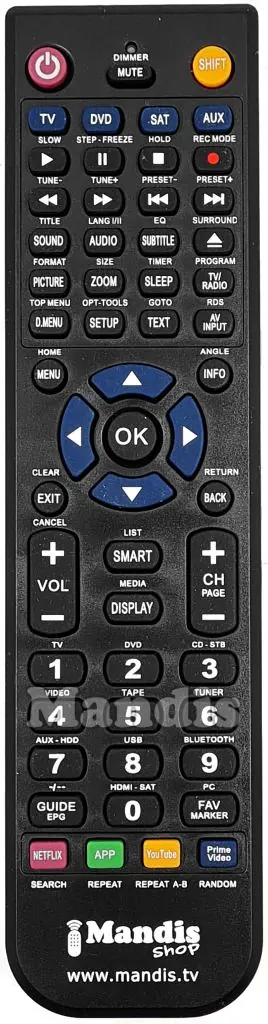
Button Mapping Overview
The replacement remote replicates the functionality of the original unit. Some advanced functions are accessed by using the SHIFT button in combination with other keys.
- Power: Standard power on/off functionality.
- Navigation: Use the directional arrows (UP, DOWN, LEFT, RIGHT) and the OK button to navigate menus.
- Media Controls: Dedicated buttons for Play, Pause, Stop, Rewind, and Fast Forward.
- Channel and Volume: Standard CH+/CH- and VOL+/VOL- controls.
- Special Functions: Many buttons have dual functions. For example, pressing SHIFT + AUDIO accesses the Lang I/II function, and SHIFT + ZOOM accesses the Size function.
- Direct Access: Includes dedicated buttons for Netflix, YouTube, and Prime Video, depending on the original device's capabilities.
Using the Shift Function
To access secondary functions printed on or associated with specific buttons, press the SHIFT button first, followed by the desired function button. For instance, to access the EPG function, you may need to use the SHIFT + Guide combination as indicated in the mapping tables.
Device Compatibility
This remote is designed as a replacement for the Q-MEDIA 1369D-EU model. Ensure your original device is compatible with this specific replacement remote before use.
Manufacturer information
Mandis
Practical help
Common problems
Function not working as expected
Check if the function requires the SHIFT button to be pressed first, as many keys have dual assignments.
Cannot access specific menu or media features
Refer to the button mapping tables to verify the correct combination of keys, especially for advanced features like EPG, Subtitles, or App access.
Before use
- Verify the model number of your original remote matches 1369D-EU.
- Ensure fresh batteries are installed in the replacement remote.
- Identify the primary buttons you use most frequently (Power, Volume, Channel).
- Review the SHIFT button combinations for advanced features.
Images and diagrams
- The provided images show the layout of the original remote and the Mandis replacement remote.
- The mapping tables list the 'Original' button label on the left and the corresponding 'Rechange' (replacement) function on the right.
Model compatibility
- Specifically designed for Q-MEDIA 1369D-EU.

Manual page author
Emily Carter
User documentation editor
Prepares concise manual descriptions and highlights the most useful setup, operation, and maintenance information for readers.