Electronics / Televisions
Mandis Oki-SB MEDIA PLAYER 1G Remote Control Replacement Guide
A comprehensive guide to the button mapping and functionality of the Mandis replacement remote control for the Oki SB MEDIA PLAYER 1G, including key assignments and media playback controls.
Table of contents
Manual images
Jump to the sectionQuick guide from the manual
This document serves as a reference for the Mandis replacement remote control designed for the Oki SB MEDIA PLAYER 1G. It maps the buttons of the original remote to the corresponding functions on the Mandis replacement unit. Use this guide to identify how to perform standard operations such as power control, volume adjustment, menu navigation, and media playback.
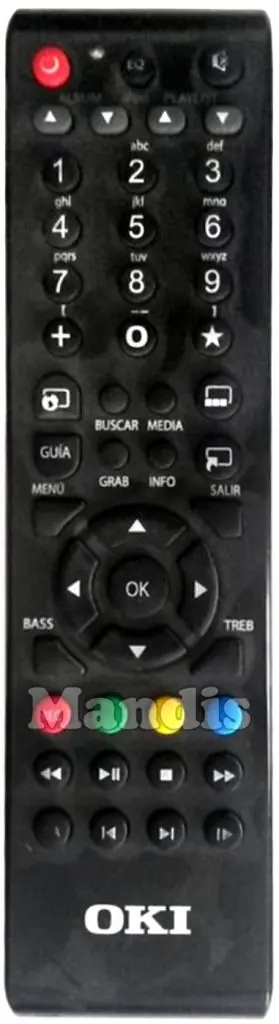
Remote control button mapping
The following list details the primary functions available on the replacement remote:
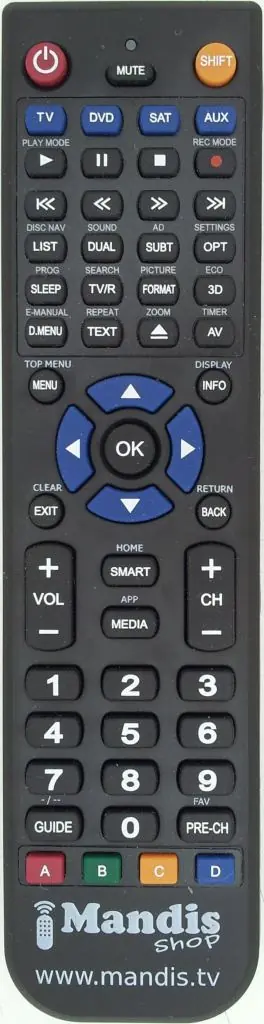
- Power: Turns the device on or off.
- Volume and Channel: Use Vol +/Vol - for volume control and Ch +/Ch - for channel navigation.
- Navigation: Use the directional arrows (Up, Down, Left, Right) and the OK button to navigate menus.
- Playback Controls: Dedicated buttons for Play, Pause, Stop, Fast Forward (>>), Rewind (<<), Next (>>I), and Previous (I<<).
- Menu and Info: Access the main menu via the Menu button and view content details using the Info button.
- Smart and Media: Direct access to Smart features and Media library.
- Color Buttons: Red, Green, Yellow, and Blue buttons are available for context-specific functions.
Advanced functions
Some functions require specific button combinations or are mapped to secondary labels:
- Shift + Pause: Access specific playback modes.
- Format: Mapped to the Bass button.
- 3D: Mapped to the Treb button.
- Back: Mapped to the Ir A button.
- Text: Mapped to the Widgets TV button.
- AV: Mapped to the Top TV button.
Manufacturer information
Mandis
Practical help
Common problems
Button function not performing as expected
Refer to the mapping tables in this guide to ensure you are pressing the correct button on the Mandis replacement remote, as some labels may differ from the original.
Cannot access specific media features
Check if the feature requires a combination, such as the Shift + Pause function for specific playback modes.
Before use
- Ensure the remote has fresh batteries installed.
- Verify the device is powered on and within range.
- Consult the button mapping table to identify the correct replacement button for your desired function.
Images and diagrams
- The left image shows the original remote layout.
- The center tables provide the direct translation between original and replacement button labels.
- The right image shows the Mandis replacement remote layout.
Model compatibility
- This remote is specifically configured as a replacement for the Oki SB MEDIA PLAYER 1G.

Manual page author
David Miller
Documentation analyst
Organizes user manual content into clear summaries, with attention to model details, product context, and everyday usability.