Electronics / Speakers & Soundbars
User Manual for NOD ROCK CONCERT Bluetooth Speaker
Quick guide for the NOD ROCK CONCERT Bluetooth Speaker. Learn how to pair via Bluetooth, use FM radio, play music from USB/microSD, and manage hands-free calls.
Table of contents
Quick guide from the manual
The NOD ROCK CONCERT is a portable Bluetooth speaker featuring multiple playback modes including USB, microSD, Aux-in, and FM radio. Key operations involve using the Mode (M) button to switch between sources and the multi-function buttons for playback control and volume adjustment. For optimal FM reception, connect a micro USB cable to the charging port to serve as an antenna.
Device Overview
The control panel contains the following inputs and controls:
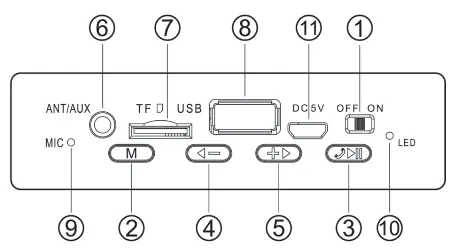
- 1. ON/OFF switch: Power the device on or off.
- 2. Mode button (M): Switch between Bluetooth, USB, microSD, Aux-in, and FM modes.
- 3. Play/Pause/Call button: Play/pause music, answer/end calls, or search for FM stations.
- 4. Previous/Volume Down: Short press for previous track/station; long press to decrease volume.
- 5. Next/Volume Up: Short press for next track/station; long press to increase volume.
- 6. Aux-in: 3.5mm jack for external audio sources.
- 7. microSD slot: Supports cards up to 32GB.
- 8. USB port: Supports USB drives up to 32GB.
- 9. Microphone: For hands-free calls.
- 10. LED indicator: Shows charging status and Bluetooth connection status.
- 11. Micro USB charging port: For charging the device.
Getting Started and Charging
Before using the speaker for the first time, ensure it is fully charged. Connect a micro USB cable to the charging port (11). The red LED indicator will light up while charging and turn off once the battery is fully charged.
Bluetooth Connection
To connect your smartphone, tablet, or laptop:
- Turn on the speaker using the ON/OFF switch.
- Enable Bluetooth on your source device.
- Search for the pairing name NOD ROCK CONCERT and select it to connect.
- Once connected, the blue LED indicator will blink slowly.
Playback Modes
Aux-in
Connect an external audio source to the 3.5mm jack. If the device does not switch automatically, press the M button to select Aux mode.
USB and microSD
Insert a USB stick or microSD card containing MP3 files into the respective slots. The speaker will automatically detect and play the music. Ensure the storage media does not exceed 32GB capacity.
FM Radio
Select FM mode using the M button. Press the Play/Pause button (3) to automatically search for radio stations. Use buttons (4) and (5) to navigate between saved stations. For better signal reception, connect a micro USB cable to the charging port.
Hands-free Operation
When the speaker is connected via Bluetooth, you can handle phone calls:
- Answer a call: Press the Play/Pause button (3).
- End a call: Press the Play/Pause button (3).
Storage
Always store the appliance out of the reach of children. Keep the speaker in a safe and clean place, preferably in its original packaging, to protect it from damage.
Practical help
Common problems
Bluetooth not connecting
Ensure the speaker is in Bluetooth mode and your source device is actively searching for 'NOD ROCK CONCERT'.
FM signal is poor
Connect a micro USB cable to the charging port (11) to act as an external antenna.
Aux mode does not start automatically
Manually switch to Aux mode by pressing the 'M' button.
Before use
- Charge the device fully before the first use.
- Ensure your USB drive or microSD card is formatted correctly and contains MP3 files.
- Keep the speaker away from children.
- Store in a clean, safe environment.
Images and diagrams
- Button 3 is the primary control for media playback and phone calls.
- Buttons 4 and 5 serve dual purposes: short presses navigate tracks/stations, while long presses adjust volume.
Model compatibility
- Compatible with Bluetooth-enabled devices (smartphones, tablets, laptops).
- Supports USB and microSD storage up to 32GB.

Manual page author
Emily Carter
User documentation editor
Prepares concise manual descriptions and highlights the most useful setup, operation, and maintenance information for readers.