Industrial / Vacuum Cleaners
User Manual for Ozito Surface Brush PXSBS-018
Quick guide for the Ozito Surface Brush PXSBS-018. Learn how to assemble, adjust, operate, and maintain your 18V cordless surface cleaner for optimal results.
Table of contents
Manual images
Click an image to enlargeQuick guide from the manual
The Ozito Surface Brush PXSBS-018 is an 18V cordless tool designed for cleaning various outdoor surfaces. Before use, ensure you have the correct brush fitted for your specific surface type (e.g., unsealed pavers, wood, or artificial turf). Always wear protective clothing, including safety gloves and eye protection, as debris may be flung during operation.
Assembly
For transport, the main handle is set at 90 degrees. To assemble and adjust:
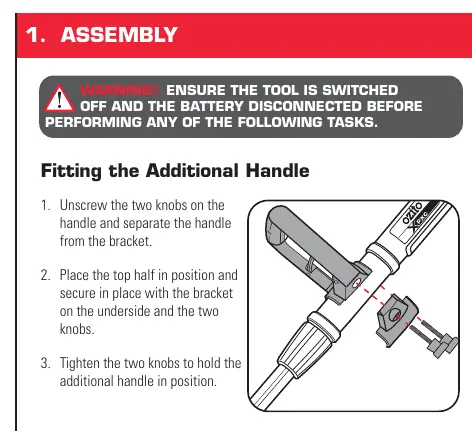
- Additional Handle: Unscrew the two knobs, separate the handle from the bracket, position the top half, secure with the bracket on the underside, and tighten the knobs.
- Working Height: Turn the Lock Nut anti-clockwise to loosen, adjust the Telescopic Shaft to your desired height, and retighten the Lock Nut by turning it clockwise.
- Handle Alignment: Turn the Lock Nut anti-clockwise to loosen and rotate the Main Handle 90 degrees to align with the brush housing.
Preparation
To achieve the best results, use wet cleaning:
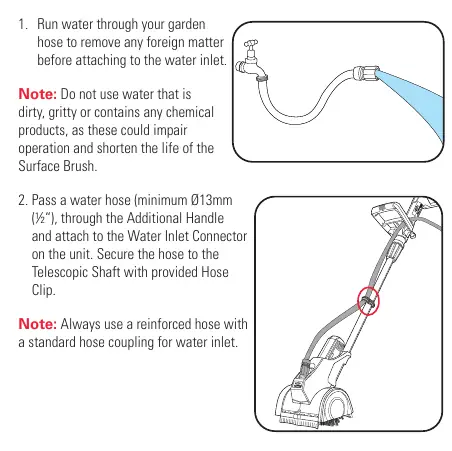
- Run water through your garden hose to clear debris before attaching.
- Attach a reinforced water hose (minimum 13mm diameter) to the Water Inlet Connector on the unit.
- Secure the hose to the Telescopic Shaft using the provided Hose Clip.
- The Water Control Valve can be fitted to the inlet to regulate water flow.
Operation
Inserting the Battery: Align the battery ribs with the mount and slide in until it clicks. Remove the battery immediately after finishing work.
Controls:
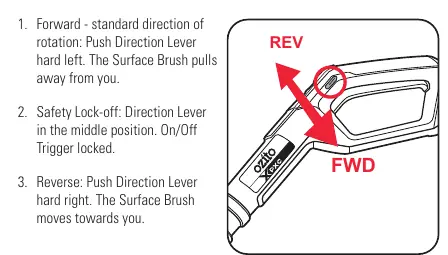
- Direction Lever: Push left for forward rotation (standard, most power), middle for safety lock-off, and right for reverse rotation. Only change direction when the brush is at a standstill.
- Variable Speed Dial: Rotate to adjust speed from 1 (slowest) to 5 (highest).
- Switching On/Off: Squeeze the On/Off Trigger to start; release to stop.
Cleaning Technique: Lift the brush 1-2cm off the ground, switch it on, wait for full speed, then place it on the surface. Guide the brush slowly in lines, similar to a broom.
Maintenance
- Cleaning: Keep air vents and motor housing free of dirt. Wipe with a clean cloth; do not use solvents.
- Storage: Store in a dark, dry place (5-30°C). Ensure rubber lips of the splash guard are not in contact with the floor.
- Brush Replacement: Replace brushes when the diameter is less than approx. 95mm.
Safety
The tool features an overload protection system. If the tool stops automatically due to overloading (e.g., pressing too hard), release the trigger, remove the cause, and restart. Never use the tool on sensitive, polished, or coated surfaces that may be damaged by rotating brushes.
Manufacturer information
Ozito
Practical help
Common problems
Tool stops automatically during use
Overload protection triggered. Release the trigger, remove the cause of the overload (e.g., too much pressure), and squeeze the trigger again to restart.
Battery fails to charge
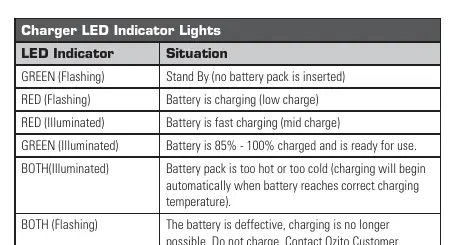
Check that there is voltage at the socket outlet and ensure the battery and charger are properly connected.
Brush not cleaning effectively
Check if the brush is worn (diameter less than 95mm) or if the wrong brush type is being used for the surface material.
Before use
- Ensure the battery is fully charged.
- Check that the correct brush is fitted for the surface type.
- Ensure brush covers are securely fitted.
- Clear the surface of stones, twigs, and debris.
- Wear safety gloves, eye protection, and protective clothing.
- Check that the water hose is securely connected if wet cleaning.
Specs in practice
- No Load Speed
- 800-1,400/min, adjustable via the variable speed dial.
- Max. Inlet Pressure
- 87 psi (6 bar) for water connection.
Images and diagrams
- Assembly: Shows how to attach the additional handle and adjust the telescopic shaft height.
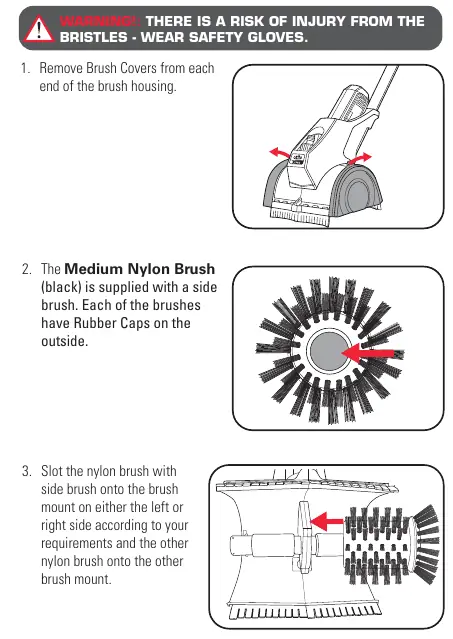
- Brush Fitting: Illustrates removing brush covers and slotting the nylon brushes onto the mount.
- Water Connection: Demonstrates attaching the garden hose to the water inlet connector.
- Controls: Shows the direction lever (FWD/REV) and variable speed dial.
Model compatibility
- Compatible with all Ozito Power X Change batteries and chargers.
- Not suitable for polished, coated, or scratch-sensitive surfaces.
- Do not use with a bucket and siphon; requires a pressurized water source.

Manual page author
David Miller
Documentation analyst
Organizes user manual content into clear summaries, with attention to model details, product context, and everyday usability.