Home Appliances / Small Kitchen Appliances
Platinum 1.7L Cordless Kettle and Toaster User Guide
Quick user guide for the Platinum 1.7L Cordless Kettle and Platinum Toaster. Includes operating instructions, safety precautions, cleaning, and troubleshooting for both appliances.
Table of contents
Manual images
Click an image to enlargeQuick Guide from the Manual
This document provides instructions for two separate appliances: the Platinum 1.7L Cordless Kettle and the Platinum Toaster. Before using either appliance, ensure the voltage matches your local power supply (220-240V). Always place appliances on a flat, level surface and keep them away from water, heat sources, and children.
Platinum 1.7L Cordless Kettle
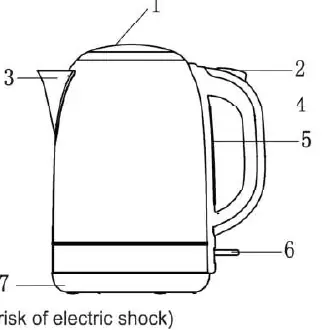
Operation
Before the first use, remove all packaging and labels. Fill the kettle to the MAX level, boil, and discard the water. Repeat this process twice to clean the interior. To use, fill through the lid, ensuring the water level is between MIN and MAX. Close the lid properly, place on the power base, and switch the unit on. The kettle will switch off automatically once boiling is complete.
Boil Dry Protection
The kettle is equipped with a safety cutout device. If the kettle is accidentally switched on without sufficient water, the device will activate. Allow the kettle to cool down for a few minutes before refilling to reset the protection.
Care and Cleaning
Always unplug and let the kettle cool before cleaning. Wipe the exterior with a damp cloth. Clean the interior regularly using a damp cloth with bicarbonate of soda. If limescale builds up, use a suitable descaler. Do not use abrasive scouring powders as they may damage the surface.
Platinum Toaster
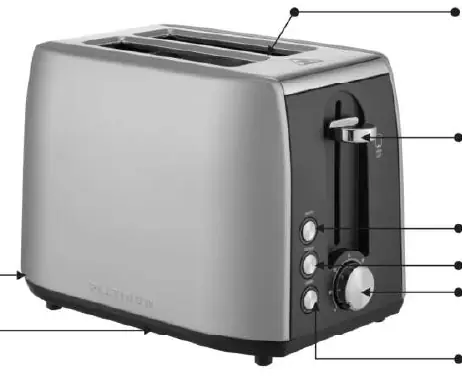
Operation
Plug the toaster into a power outlet. Insert bread into the slots and select the desired browning level using the Electronic Browning Control (1-7). Push the toasting lever down to start. The toaster will automatically pop the toast up when finished. Use the Cancel button to interrupt the cycle at any time.
Features
- High-lift: Raises the toast above the starting position for easy removal of small items like crumpets or muffins.
- Reheat/Defrost: Dedicated buttons allow for reheating already toasted bread or defrosting frozen bread before toasting.
- Self-centering slots: Ensures bread is held in the center for even toasting.
Care and Cleaning
Always unplug the toaster before cleaning. Wipe the exterior with a damp cloth. Regularly slide out and empty the crumb tray to prevent fire hazards. To clean the interior, unplug the appliance, turn it upside down over a sink, and gently shake out the crumbs.
Warranty Information
The product includes a 1-year warranty from the date of purchase. Keep your receipt as proof of purchase. The warranty does not cover damage caused by misuse, failure to follow instructions, or commercial use. For further assistance, contact customer care at 0800 01 07 09.
Practical help
Common problems
Kettle switches off before boiling
Usually caused by limescale buildup inside. Descale the kettle.
Kettle does not work
Check if the power supply is connected. If the kettle boiled dry, wait for the safety cutout to reset.
Water has a plastic taste
This may occur after the first use. Boil and discard water. If it persists, boil with 2 teaspoons of bicarbonate of soda.
Toaster jammed
Never use a knife or metal object to extract jammed bread, as this may cause electrocution. Unplug the appliance first.
Before use
- Remove all packaging and labels.
- Kettle: Boil and discard water twice before first use.
- Ensure the power supply matches the rating label (220-240V).
- Place appliances on a flat, level surface.
- Ensure the crumb tray is in place (Toaster).
Specs in practice
- Capacity (Kettle)
- 1.70 Litres maximum water capacity.
- Wattage (Kettle)
- 2000W power consumption.
- Wattage (Toaster)
- 900W power consumption.
Images and diagrams
- Kettle: Features a lid, push button, spout, water level indicator, and on/off switch.
- Toaster: Features self-centering slots, crumb tray, high-lift lever, and browning control dial.
Model compatibility
- Kettle is for boiling water only.
- Do not use external timers or remote control systems with these appliances.
- Not intended for outdoor use.

Manual page author
Emily Carter
User documentation editor
Prepares concise manual descriptions and highlights the most useful setup, operation, and maintenance information for readers.