Automotive / Infotainment Systems
User Manual for Portronics Nebula X Party Speaker
Quick guide for the Portronics Nebula X party speaker. Learn how to connect via Bluetooth, use TWS mode, control playback, adjust RGB lights, and charge your device.
Table of contents
Quick Guide for Portronics Nebula X
The Portronics Nebula X is a portable party speaker designed for indoor and outdoor use. This guide provides essential instructions for operating the device, including power management, connectivity, and advanced features like TWS and RGB lighting.
Device Controls and Layout
The top panel of the speaker features the following controls:
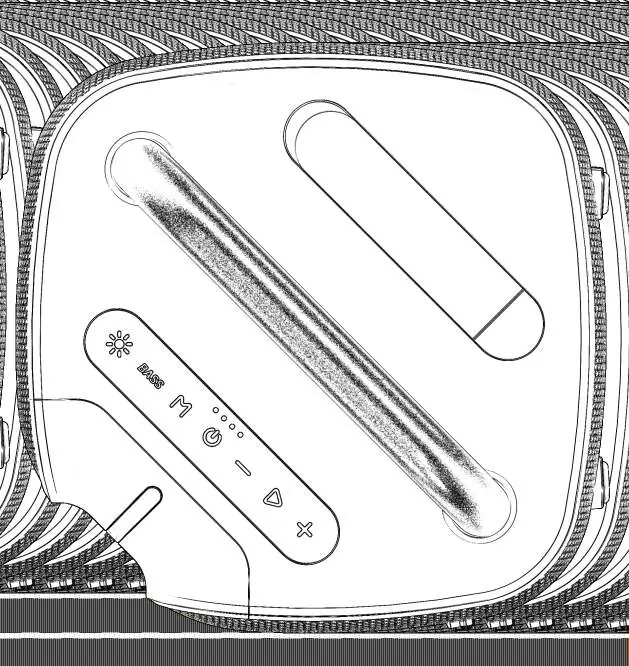
- Power Switch: Hold for more than 2 seconds to turn the speaker on or off.
- M (Mode) Button: Short press to switch between BT (Bluetooth), USB, and AUX modes.
- Bass Button: Press to increase bass. Hold for more than 2 seconds to enter or exit TWS mode.
- Play/Pause/Mute: Press to play or pause music. In AUX mode, press to mute/unmute.
- Volume +/-: Press to adjust volume (range U00-U15). Long press to skip to the next or previous track.
- Light Switch: Hold for more than 2 seconds to turn RGB lights on/off. Press to select light effects.
Power and Charging
When the battery is low, the speaker will emit a warning beep. To recharge, connect the speaker to a power source using a Type-C charging cable. Ensure you use an adapter with a minimum output of 5V/3A for optimal charging performance.
Bluetooth and Playback Modes
Bluetooth Connection:
- Short press the M button to switch to BT mode.
- A prompt voice will indicate the speaker is ready.
- Select "Portronics Nebula X" on your Bluetooth device to connect.
- A prompt sound confirms a successful connection.
USB Mode: Plug in a USB drive. The speaker will automatically switch to USB source and begin playback. The last plugged device takes priority.
AUX Mode: Insert an AUX cable and press the M button to switch to AUX mode.
Advanced Features
TWS (True Wireless Stereo) Function:
- Switch both speakers to Bluetooth mode.
- On one speaker, press and hold the BASS button for more than 2 seconds.
- A prompt voice will indicate successful TWS connection, and the indicator lights on the BASS key will turn on for both speakers.
- To exit TWS mode, press and hold the BASS button on either speaker for more than 2 seconds.
Support
For support, visit www.portronics.com, email [email protected], or call +91 9555245245 (Monday - Saturday, 10:00am - 6:00pm).
Official resources from the manual
Practical help
Common problems
TWS mode not connecting
Ensure both speakers are in Bluetooth mode before pressing and holding the BASS button on one speaker.
Speaker not charging or charging slowly
Ensure you are using a Type-C cable and an adapter with a minimum output of 5V/3A.
Low battery warning
The speaker will beep when the battery is low; connect to a power source immediately.
Before use
- Charge the speaker fully using a 5V/3A adapter.
- Ensure the Type-C cable is securely connected.
- Check that your Bluetooth device is ready for pairing.
- Verify the desired playback mode (BT, USB, or AUX) is selected.
Images and diagrams
- The top panel contains the main interface including the Power button, Mode (M) button, Bass adjustment, Play/Pause/Mute, Volume controls, and Light switch.
- The rear/side panel features the Type-C charging port, USB port, and AUX input socket.
Model compatibility
- Supports Bluetooth, USB (MP3), and AUX input.
- TWS function requires two compatible speakers.

Manual page author
Michael Turner
Technical manual editor
Reviews PDF manuals for structure, safety notes, and practical product details so readers can find the right information quickly.