Mobile / Smartphones
User Manual for Redmi Note 10S Smartphone
Quick start guide and safety information for the Redmi Note 10S smartphone. Learn how to set up your device, install SIM cards, and follow important safety precautions.
Table of contents
Quick Start Guide
To turn on your Redmi Note 10S, long press the power button. Follow the on-screen instructions to configure the device for initial use.
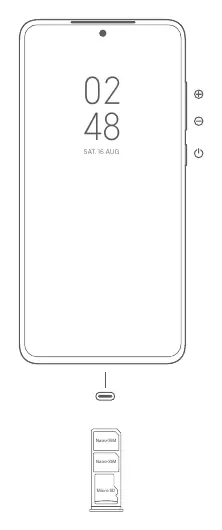
About Dual SIM
The device supports dual nano-SIM cards. When using both SIM card slots, either card can be set as the primary card. Please note that Dual 4G SIM availability depends on your telecom operator and region. Do not insert non-standard SIM cards into the slot, as this may cause damage.
Important Safety Information
Read all safety information before using your device to prevent fire, explosion, or other risks:
- Operating Temperature: The device operates between 0°C and 40°C. Using it outside this range may damage the device.
- Battery Safety: Do not attempt to replace the built-in battery yourself. Only use authorized cables and power adapters. Do not charge the device for more than 12 hours.
- Handling: Do not disassemble, hit, crush, or burn the battery. If the battery appears deformed or damaged, stop using it immediately.
- Repairs: Do not attempt to repair the device yourself. Contact Mi customer support or an authorized repair center for any issues.
Safety Precautions
Observe all laws and regulations restricting the use of mobile phones in specific situations:
- Explosive Environments: Turn off your phone at petrol stations or in areas with potentially explosive atmospheres, such as fueling areas or chemical storage facilities.
- Medical Devices: Maintain a minimum distance of 15 cm between your phone and pacemakers. Consult your doctor or device manufacturer if you use medical equipment like hearing aids or cochlear implants.
- Aircraft: Observe all aircraft safety regulations and turn off your phone when required.
- Driving: Use your phone in accordance with relevant traffic laws and regulations.
- Environment: Do not use the phone outdoors during thunderstorms to avoid lightning strikes. Do not use the phone in high-humidity areas like bathrooms.
Legal Information
This device is restricted to indoor use only when operating in the 5150 to 5350 MHz frequency range in EU member states. Ensure the power adapter meets the requirements of Clause 6.4.5 in IEC/EN 62368-1.
Disposal and Recycling
This product must not be discarded with household waste. Please recycle responsibly using return and collection systems or contact the retailer where the device was purchased.
Manufacturer information
Redmi
Practical help
Common problems
Device will not turn on
Ensure the device is charged and long-press the power button.
SIM card not recognized
Ensure you are using standard nano-SIM cards and that they are inserted correctly into the tray.
Battery performance issues
Do not charge for more than 12 hours and use only authorized chargers.
Before use
- Charge the device using the included cable and adapter.
- Insert nano-SIM cards into the SIM tray.
- Follow on-screen instructions for initial configuration.
- Update the operating system using the built-in software update feature.
- Keep the device dry and within the 0°C to 40°C temperature range.
Specs in practice
- Operating Temperature
- 0°C to 40°C. Usage outside this range may damage the device.
- Charging Limit
- Do not charge the device for more than 12 hours.
Images and diagrams
- The diagram on page 3 illustrates the location of the power button, volume buttons, and the SIM/Micro SD card tray.
Model compatibility
- Dual 4G SIM availability depends on telecom operators and regions.
- VoLTE support is region-specific.
- Indoor use restriction applies to 5150-5350 MHz frequency range in EU countries.

Manual page author
Emily Carter
User documentation editor
Prepares concise manual descriptions and highlights the most useful setup, operation, and maintenance information for readers.