Mobile / Smartphones
Technical Specifications for Redmi 14C Smartphone
A quick guide to the technical specifications and hardware features of the Redmi 14C smartphone, including physical dimensions, display details, and network connectivity support.
Table of contents
Quick guide from the manual
This document outlines the technical specifications and hardware layout for the Redmi 14C smartphone. It provides essential data regarding the device's physical dimensions, display capabilities, and network compatibility to assist users in understanding the hardware limitations and features.
External Dimensions
The device has the following physical measurements:
- Height: 171.88mm
- Width: 77.8mm
- Thickness: 8.22mm
- Weight: 204g (including battery cover)
Note: These data points are based on test results from Xiaomi's laboratories and may vary slightly due to differences in measurement methods.
Hardware Layout
The Redmi 14C features the following physical controls and interfaces:
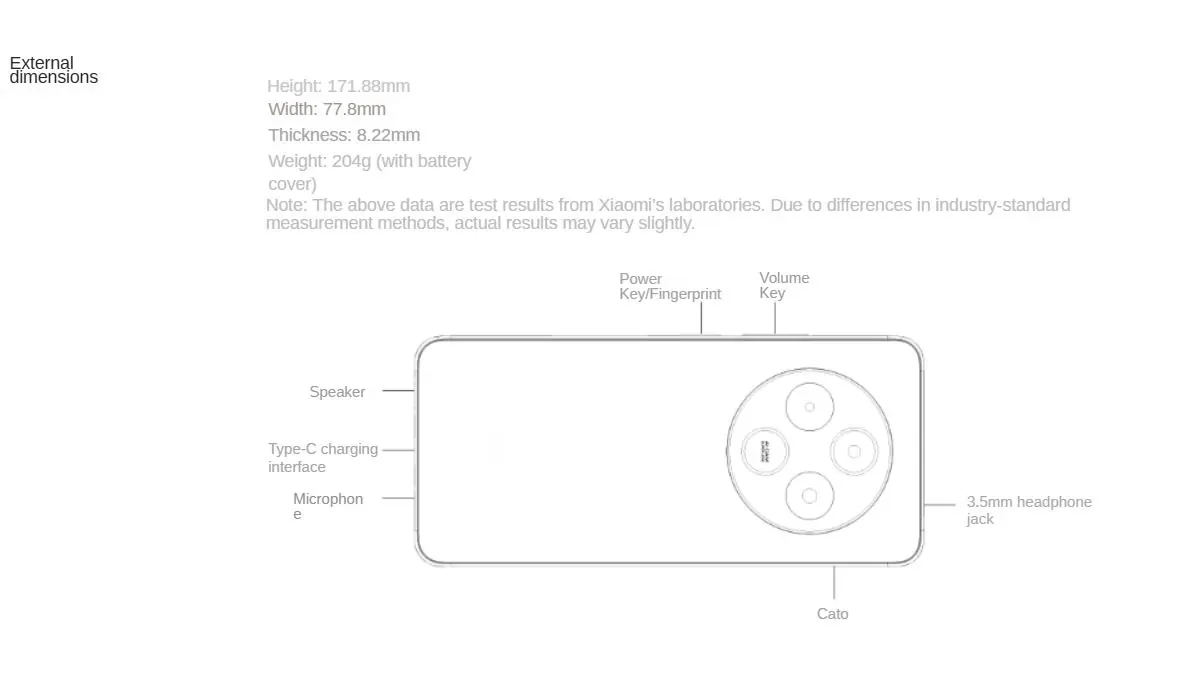
- Power Key/Fingerprint Sensor: Located on the side of the device.
- Volume Key: Located on the side of the device.
- Speaker: Positioned on the device body.
- Type-C Charging Interface: Located at the bottom.
- Microphone: Located at the bottom.
- 3.5mm Headphone Jack: Located on the device.
- Card Slot: 2+1 card slot supporting dual SIM.
Screen Specifications
The display offers the following technical parameters:
- Size: 6.88 inches
- Resolution: 1640 x 720
- Refresh Rate: Up to 120Hz
- Global Brightness: 600nit
- Touch Sampling Rate: Up to 240Hz
- Features: Supports Rhythm Eye Protection, Classic Eye Protection, and Wet Hand Touch.
Network and Connectivity
The device supports dual 4G and VoLTE HD. It features a 2+1 card slot for unlimited operators. Supported network bands include:
- 4G: FDD-LTE (B1/B3/B5/B8), TDD-LTE (B34/B38/B39/B40/B41)
- 3G: WCDMA (B1/B5/B8)
- 2G: GSM (B3/B5/B8), CDMA 1X (BC0)
Note: Radio and Television services do not support 2G/3G networks or MMS. Support for specific services depends on the operator's local network and business deployment.
Manufacturer information
Redmi
Practical help
Common problems
Network service not working
Ensure your operator supports the specific bands listed (e.g., FDD-LTE B1/B3/B5/B8). Note that Radio and Television services may have limited network support.
VoLTE not active
Verify that your local network operator supports VoLTE HD services, as functionality depends on local deployment.
Before use
- Verify SIM card compatibility with the 2+1 card slot.
- Check if your mobile operator supports the listed 4G/3G/2G bands.
- Ensure you have a compatible Type-C charging cable.
- Confirm if your region supports the specific network bands listed.
Specs in practice
- Refresh rate (120Hz)
- Determines how many times per second the screen updates; higher values result in smoother scrolling and animations.
- Touch sampling rate (240Hz)
- Indicates how often the screen checks for touch input; higher values provide faster response times.
- Global brightness (600nit)
- Measures the maximum brightness of the screen, affecting visibility in bright outdoor conditions.
Images and diagrams
- The power key doubles as a fingerprint sensor.
- The device includes a dedicated 3.5mm headphone jack.
- The charging port is a standard Type-C interface.
Model compatibility
- Does not support TD-SCDMA standard (mobile 3G).
- Does not support CDMA 2000 EVDO standard (Telecom 3G).
- Radio and Television services do not support 2G/3G networks or MMS.

Manual page author
David Miller
Documentation analyst
Organizes user manual content into clear summaries, with attention to model details, product context, and everyday usability.