Electronics / Monitors
RICOH 150/150BW Portable Monitor User Guide
Quick setup and operation guide for the RICOH 150 and 150BW portable monitors, covering connection, charging, stand adjustment, and wireless features.
Table of contents
Product Overview
The RICOH 150 and 150BW are portable monitors designed for flexibility and ease of use. The package includes the monitor, protective components, and necessary cables for immediate setup.
Setup and Connection
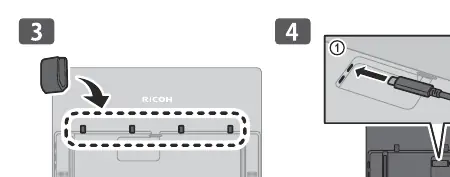
To begin using your monitor, attach the provided protective components to the rear of the device. Connect the monitor to your computer using the appropriate USB cable. Ensure the cable is securely seated in the designated port. The monitor supports various viewing angles, adjustable up to 148 degrees, allowing for both landscape and portrait orientations.
Power and Charging
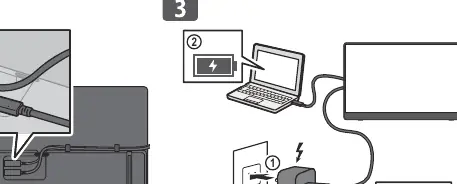
The 150BW model features a built-in battery. When the battery level is low (0-15%), connect the monitor to a power source using a compatible power adapter (minimum 20W output). The LED indicator will show the charging status. Always ensure the power source meets the required specifications to prevent damage.
Operation and Wireless Features
The monitor includes physical buttons for menu navigation and input selection. For the 150BW model, wireless connectivity can be managed through the on-screen menu. Use the side-mounted controls to select your preferred connection method and adjust display settings.
Safety and Maintenance
Handle the monitor with care. Do not apply excessive pressure to the screen surface. When not in use, fold the stand carefully to avoid damage to the hinge mechanism. Keep the device away from extreme temperatures and moisture. For cleaning, use a soft, dry cloth; do not use harsh chemicals or abrasive materials.
Related manuals
Related manuals from the same brand or category.