Electronics / Monitors
RICOH Portable Monitor 150/150BW Quick Start Guide
Quick setup and operation guide for the RICOH Portable Monitor 150 and 150BW, covering connection, stand adjustment, and power management.
Table of contents
Product Overview
The RICOH Portable Monitor 150 and 150BW are lightweight, versatile displays designed for mobile productivity. The package includes the monitor, necessary cables, and protective accessories to ensure safe transport and usage.
Setup and Connection
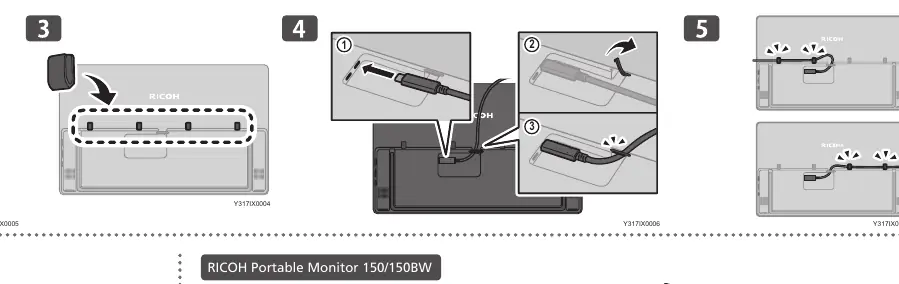
To begin using the monitor, connect it to your computer using the provided USB-C cable. Ensure the cable is securely seated in the port. For the 150BW model, wireless connectivity options may be available depending on your configuration. Always ensure your host device supports the required power and data output for the monitor.
Stand Adjustment
The monitor features an integrated stand that allows for various viewing angles. You can adjust the tilt between 15 and 148 degrees to suit your ergonomic needs. Avoid applying excessive pressure to the screen surface or forcing the stand beyond its mechanical limits to prevent damage.
Power Management
The monitor requires a stable power source. When using the 150BW model, monitor the battery level indicator. If the charge is low (0-15%), connect the device to a power adapter providing at least 20W. Follow the specific charging sequences indicated by the LED status lights to ensure optimal battery health.
Safety and Maintenance
- Keep the device away from liquids and extreme temperatures.
- Use only the provided cables and power adapters.
- Clean the screen with a soft, dry cloth; do not use harsh chemicals.
- When not in use, fold the stand and store the monitor in its protective sleeve.
Troubleshooting
If the monitor fails to display an image, verify that the cable connections are secure and that the host device is powered on. Check the LED indicators for power status. If the device remains unresponsive, ensure the power adapter meets the 20W minimum requirement.
Related manuals
Related manuals from the same brand or category.