Sabrent MS-RCWM Rechargeable Wireless Mouse User Manual
Quick guide for the Sabrent MS-RCWM rechargeable wireless mouse. Learn how to install the USB receiver, adjust DPI settings, and recharge the battery.
Quick answers from the manual
Quick answer
- To install the mouse, remove the USB receiver from the storage compartment and plug it into your computer. To charge, connect the USB cable to the mouse and a computer USB port. p. 1
Key actions
- Adjust DPI settings p. 1
Technical specifications
| Parameter | Value | Meaning | Pages |
|---|---|---|---|
| DPI | 800 / 1200 / 1600 | Adjustable sensitivity levels | p. 1 |
| Battery | 600mAh | Lithium battery capacity | p. 1 |
Where to find it in the PDF
- User Manual p. 1
Table of contents
Manual images
Click an image to enlargeQuick guide from the manual
This guide covers the basic setup and maintenance of the Sabrent MS-RCWM wireless mouse. Ensure you have the USB receiver and charging cable ready.
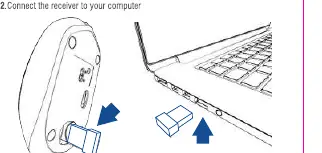
Installation
- Locate the USB receiver in the mouse's storage compartment.
- Remove the receiver and connect it to an available USB port on your computer.
Recharging
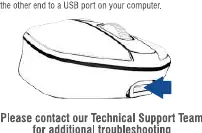
- Connect the provided USB cable to the charging port on the front of the mouse.
- Connect the other end of the cable to a USB port on your computer.
Features
- Adjustable DPI: 800, 1200, or 1600 settings.
- Battery: Rechargeable 600mAh Lithium battery.
- Connectivity: 2.4GHz wireless transmission.
- Controls: 3 buttons and a dedicated DPI toggle button.
Technical Support
For additional troubleshooting, please visit www.sabrent.com.
Official resources from the manual
Manufacturer information
Sabrent
Practical help
Common problems
Mouse not responding
Ensure the USB receiver is plugged into the computer and the mouse is sufficiently charged.
Before use
- Remove the USB receiver from the storage compartment
- Plug the receiver into the computer
- Charge the mouse using the USB cable

Manual page author
Emily Carter
User documentation editor
Prepares concise manual descriptions and highlights the most useful setup, operation, and maintenance information for readers.