Electronics / Televisions
Replacement Remote Control for Samsung 00052A
Quick guide to button mapping and functions for the Samsung 00052A replacement remote control. Learn how to access original features using the substitute layout.
Table of contents
Quick guide from the manual
This document provides a comprehensive mapping between the original Samsung 00052A remote control buttons and the corresponding buttons on the replacement unit. Use this guide to locate specific functions such as playback controls, menu navigation, and device settings.
Button Mapping Overview
The replacement remote replicates the functionality of the original Samsung 00052A. Some functions require the use of a Shift key combination to access secondary features.
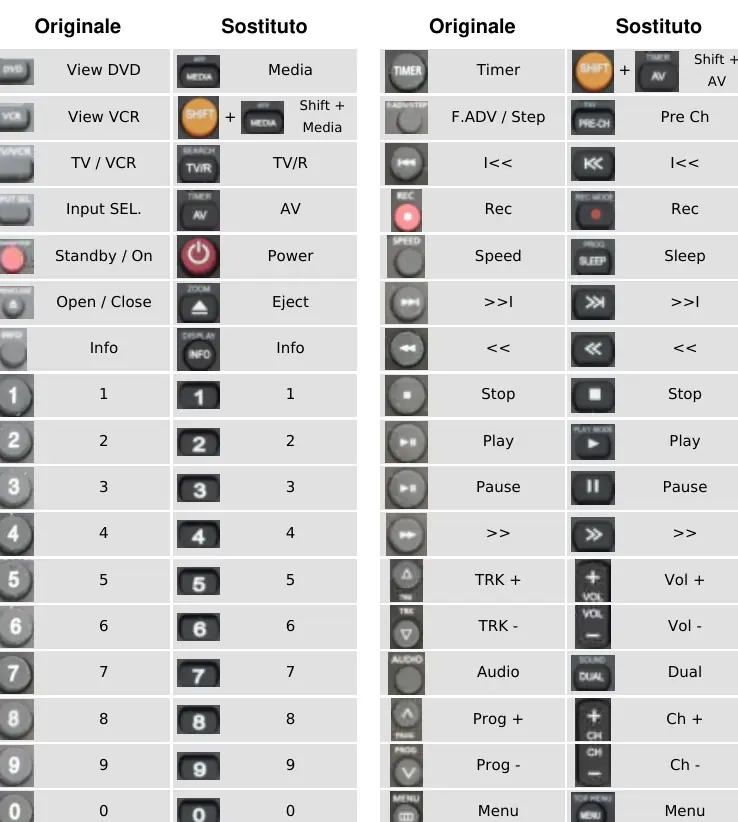
- Media Controls: View DVD and VCR functions are mapped to the Media button, often requiring a Shift combination.
- Navigation: Standard directional arrows (Up, Down, Left, Right) and the OK button function identically to the original.
- Playback: Standard buttons for Play, Pause, Stop, Fast Forward, and Rewind are clearly labeled and mapped directly.
- Advanced Features: Functions like Disc Menu, Zoom, and Subtitle are mapped to specific substitute buttons, sometimes requiring the Shift key.
Shift Key Functions
Certain original functions are accessed by pressing the Shift button in combination with another key:
- Shift + Media: Accesses VCR functions.
- Shift + AV: Accesses Timer functions.
- Shift + Eject: Accesses Zoom functions.
- Shift + TV/R: Accesses Mark/Search functions.
Manufacturer information
Samsung Electronics
Practical help
Common problems
Cannot find specific original function
Check the Shift key combinations listed in the mapping guide, as some functions are secondary.
Playback controls not responding
Ensure the remote is in the correct mode and that the batteries are fresh.
Before use
- Verify the model number 00052A matches your original device.
- Install fresh batteries into the replacement remote.
- Review the button mapping table to locate your most frequently used functions.
- Test basic navigation buttons (Up, Down, OK) to ensure connectivity.
Images and diagrams
- The provided diagrams show a side-by-side comparison of the original remote layout and the replacement remote layout.
- The tables map every original button to its new location on the replacement device.
Model compatibility
- This remote is specifically designed as a replacement for the Samsung 00052A model.

Manual page author
David Miller
Documentation analyst
Organizes user manual content into clear summaries, with attention to model details, product context, and everyday usability.