User Guide for Sandberg Powerbank USB-C PD 20W 20000
Quick guide for the Sandberg Powerbank USB-C PD 20W 20000 (Model 420-59). Learn how to charge the powerbank, check battery capacity, and charge your mobile devices.
Quick answers from the manual
Quick answer
- To charge the powerbank, connect it to a power source via the USB-C or Micro USB port. To charge your devices, connect them to the USB or USB-C output ports and press the button. p. 2, 3
Key actions
- Charge the powerbank p. 2
- Check battery capacity p. 2
- Charge devices p. 3
First start
- The powerbank is ready to use out of the box, but it is recommended to fully charge it before first use. p. 2
Technical specifications
| Parameter | Value | Meaning | Pages |
|---|---|---|---|
| Capacity | 20000 mAh | Total battery capacity | p. 1 |
| Charging Power | 20W | Power Delivery output | p. 1 |
Where to find it in the PDF
- Charging the Powerbank p. 2
- Charging Devices p. 3
- Warranty and Support p. 4
Table of contents
Manual images
Click an image to enlargeQuick guide from the manual
This guide provides instructions for the Sandberg Powerbank USB-C PD 20W 20000 (Model 420-59). It covers charging the powerbank itself, checking the battery level, and charging connected devices.
Charging the Powerbank
You can charge the powerbank using either the USB-C or Micro USB port. Connect the powerbank to a USB AC charger using a compatible cable. The charging status display will indicate the current battery percentage.
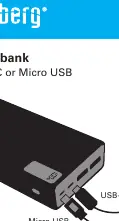
Checking Battery Capacity
To check the remaining battery capacity, press the button located on the side of the powerbank. The digital display will show the current charge level.
Charging Devices
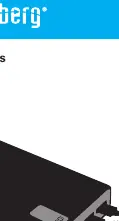
To charge your devices, connect them to the powerbank using the available USB or USB-C output ports. If charging does not start automatically, press the button on the powerbank.
Support and Warranty
The product includes a five-year warranty. For support, visit http://helpdesk.sandberg.world. Please register your new Sandberg product at www.sandberg.world/warranty. For information on handling electronic waste, visit www.sandberg.world/weee.
Official resources from the manual
Manufacturer information
Sandberg A/S
Practical help
Common problems
Ensure the USB cable is securely connected to both the powerbank (USB-C or Micro USB port) and the power adapter.
Ensure the device is connected to the correct USB or USB-C port and press the button on the powerbank to activate the output.
Before use
- Check the battery level by pressing the button.
- Ensure you have a compatible USB-C or Micro USB cable for charging the powerbank.
- Ensure you have the correct cables for your devices.

Manual page author
David Miller
Documentation analyst
Organizes user manual content into clear summaries, with attention to model details, product context, and everyday usability.