Home / Security
Security Brands 14-RK10 Ridge ResKey User Guide
Comprehensive installation and programming guide for the Security Brands 14-RK10 Ridge ResKey keypad, covering setup, pairing, and code management.
Table of contents
Product Overview
The Ridge ResKey (Model 14-RK10) is a wireless keypad designed for secure access control of gates and doors. It is compatible with various receivers, including the Ridge 2.0 Transceiver (14-REC20) and 300-MHz receivers (e.g., 14-REC300). The unit is IP44-rated, offering protection against the elements, though it should be installed in a covered location for optimal longevity.
Installation
To install the unit, follow these steps:
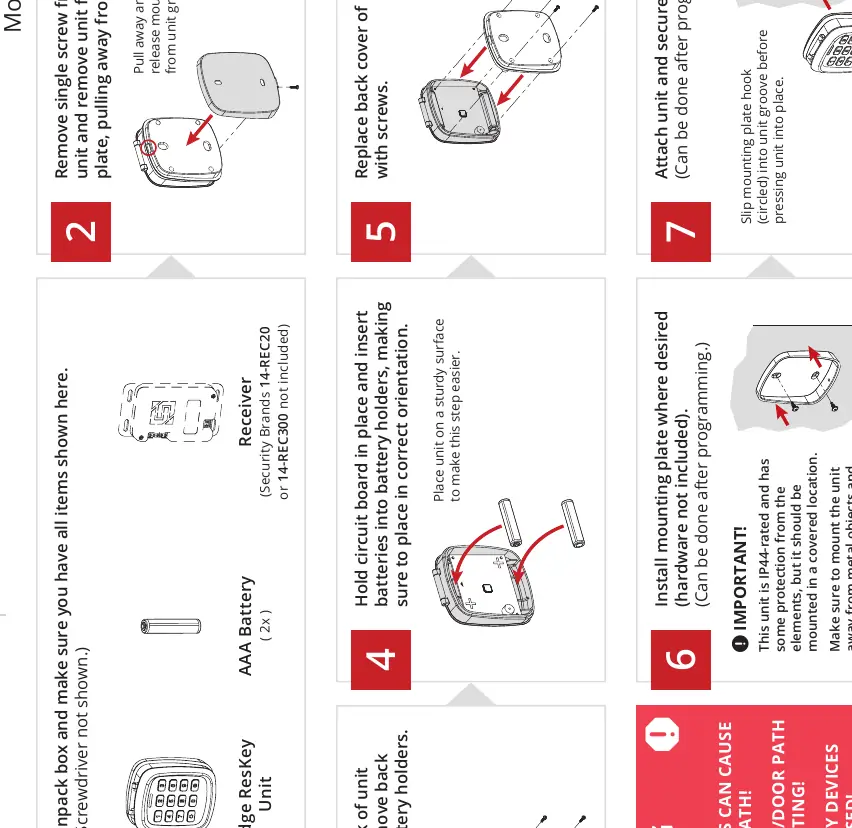
- Unpack the box and ensure all components are present.
- Remove the screws from the back housing to access the battery holders.
- Insert two AAA batteries, ensuring correct orientation.
- Secure the back cover with screws.
- Mount the backplate to the desired surface (hardware not included).
- Attach the unit to the mounting plate by slipping the hook into the groove and securing it with the bottom screw.
Important: Mount the unit away from metal objects or sources of interference that may block RF transmission.
Safety Warnings
Automatic gates and doors pose a risk of serious injury or death. Always ensure the path is clear before operation. The use of reversing or other safety devices is mandatory.
Programming
The keypad supports two primary programming modes depending on your receiver type:

433-MHz Programming (Ridge 2.0 Transceiver)
To pair, press and hold the programming button on the receiver for two seconds until the LED lights up. Perform the desired programming sequence on the keypad. The LED will turn off upon successful pairing.
300-MHz Programming
For 300-MHz receivers, ensure custom DIP switch positions are used for security. Programming sequences allow for adding or deleting access codes, changing the master code, and managing limited-use codes.
Maintenance and Support
The unit requires minimal maintenance beyond battery replacement. If you encounter issues, ensure the master code is correct and that the receiver is within range. For further assistance, contact technical support via phone or email.
Related manuals
Related manuals from the same brand or category.