Home / Security
Security Brands Remote 300 Instructions
Comprehensive setup and operation guide for the Security Brands Remote 300, a 300-MHz wireless access control transmitter.
Table of contents
Product Overview
The Remote 300 is a versatile 300-MHz wireless transmitter designed for access control systems. It features two programmable buttons, allowing users to pair each button with a separate receiver or the same receiver for convenient gate or door operation. The device comes with a pre-installed CR2032 battery and a visor clip for easy mounting in vehicles.
Safety Information
Warning: Automatic gates can cause serious injury or death. Always ensure the gate path is completely clear before operating the device. It is essential to use reversing sensors or other safety devices in conjunction with your gate system to prevent accidents.
Setup and Configuration
To configure the Remote 300, you must match its internal DIP switch settings with those of your 300-MHz receiver. For security purposes, it is highly recommended to use custom DIP switch positions rather than the factory defaults. Follow these steps to program the remote:
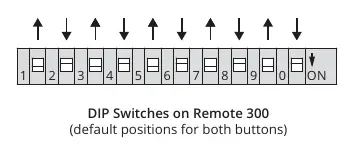
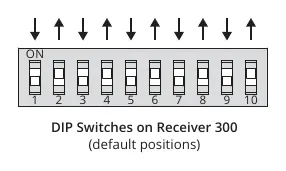
- Open the remote unit by removing the two screws on the bottom side and carefully separating the case. Ensure the circuit board remains attached to the base.
- Locate the DIP switches on the circuit board that correspond to the specific button you wish to program.
- Adjust the switches to match the exact configuration set on your receiver. Note that some receivers may label the 'off' position as 'OPEN' or use '0' instead of '10'.
- Repeat the process for the second button if needed.
- Reassemble the unit and secure it with the screws.
Operation
To operate the system, ensure you are within range of the receiver. Press the button on the remote that you have linked to the desired receiver. The status LED on the remote should light up, indicating a signal is being sent. The receiver will then trigger the gate or door.
Troubleshooting
If the receiver fails to respond, verify the following:
- Check that the receiver has power.
- Confirm the remote LED lights up when a button is pressed; if not, replace the battery.
- Ensure the receiver antenna is not obstructed by a metal enclosure.
- Verify that the DIP switch positions on both the remote and the receiver are identical.
- If using a third-party receiver, confirm that the frequency jumper is set to the 300-MHz position.
Related manuals
Related manuals from the same brand or category.