Smart Home / Sensors Buttons
User Manual for Solight 1D100PIR Smart WiFi PIR Sensor
Quick guide for the Solight 1D100PIR Smart WiFi PIR Sensor. Learn how to install batteries, pair with the Smart Life app, configure detection settings, and troubleshoot motion alerts.
Quick answers from the manual
Quick answer
- The Solight 1D100PIR is a smart motion sensor that connects to the Smart Life app via 2.4GHz Wi-Fi to provide real-time intrusion alerts. p. 1, 7
Key actions
- Pairing the device p. 5, 6
- Setting an alarm manually p. 8
First start
- Insert batteries and pair via Smart Life app p. 3, 5
Maintenance and reset
- Battery replacement p. 3
Technical specifications
| Parameter | Value | Meaning | Pages |
|---|---|---|---|
| Input voltage | 2 x AAA batteries | Power source | p. 3 |
| Detection distance | 6-8 m | Range of detection | p. 3 |
Where to find it in the PDF
- Detection Area p. 2
- Parameters p. 3
Table of contents
Manual images
Click an image to enlargeQuick Guide
The Solight 1D100PIR is a smart motion sensor designed for indoor use. It detects human movement using infrared technology and sends alerts to your smartphone via the Smart Life app. The device requires a 2.4GHz Wi-Fi connection to function.
Technical Specifications
- Input voltage: 2 x AAA batteries
- Detection distance: 6-8 meters
- Detection angle: 110°
- Wi-Fi: IEEE 802.11b/g/n 2.4GHz
- Working temperature: -10°C to 55°C
- Working humidity: 10% to 90% RH
Installation
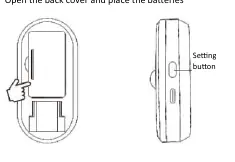
To prepare the device for use, open the back cover and insert two AAA batteries. Ensure the device is placed in a location suitable for indoor use, keeping in mind the detection range of 6-8 meters.
App Pairing
Follow these steps to connect the sensor to your network:
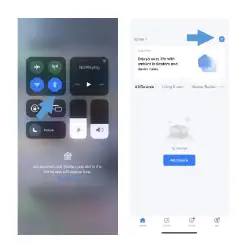
- Enable Bluetooth on your mobile device.
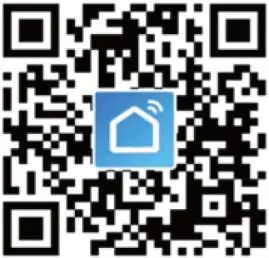
- Download and open the Smart Life app.
- Click the "+" icon in the app to add a new device.
- On the detector, press and hold the pairing button for approximately 5 seconds until the indicator light flashes.
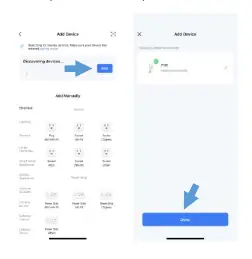
- The app will display "Discovering devices". Press "Add".
- Enter your Wi-Fi password and press "Done" to complete the connection.
Operation and Status
Once connected, the app will display the current status of the sensor:
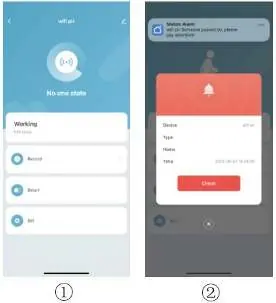
- No one state: Indicates no movement has been detected.
- Motion Alarm: Indicates the sensor has detected a person, and a "Someone passed by" alert is sent to your phone.
Settings and Features
You can configure alarm settings directly in the app or by pressing the button on the device 4 times. Key features include:
- Battery level: Monitor the charge level of the batteries.
- Motion alarm: Enable or disable notifications for detected motion.
- Lower battery: Toggle warnings for low battery status.
- Device sharing: Share access to the detector with family members.
- Intelligent interconnection: Link the sensor with other smart devices via the Smart Life app.
Practical help
Common problems
Device not connecting to Wi-Fi
Ensure Bluetooth is enabled on your phone during pairing. Hold the pairing button on the device for 5 seconds until the indicator flashes.
Short battery life
Battery life is dependent on the frequency of motion detection. High traffic areas will drain the battery faster.
Before use
- Insert 2x AAA batteries
- Enable Bluetooth on your smartphone
- Download the Smart Life app
- Ensure a 2.4GHz Wi-Fi network is available
Specs in practice
- Detection distance
- The range within which the sensor can detect movement (6-8 meters).
- Detection angle
- The field of view of the sensor (110°).
Images and diagrams
- The detection area diagrams illustrate the sensor's coverage from top and side perspectives.
- The setting button is located on the side of the device.
Model compatibility
- Intended for indoor use only.
- Requires Smart Life app for full functionality.

Manual page author
Michael Turner
Technical manual editor
Reviews PDF manuals for structure, safety notes, and practical product details so readers can find the right information quickly.