Smart Home / Sensors Buttons
User Manual for Solight 1D100TH Smart Wi-Fi Temperature and Humidity Sensor
Quick guide for the Solight 1D100TH Smart Wi-Fi Temperature and Humidity Sensor. Learn how to pair the device, configure app settings, set alerts, and use smart features.
Quick answers from the manual
Quick answer
- The Solight 1D100TH is a smart Wi-Fi sensor that monitors temperature and humidity. It connects via the Smart Life app using either Bluetooth or EZ mode. p. 1, 5
Key actions
- Pairing the device p. 6, 7
First start
- Insert batteries, download Smart Life app, register, and add device. p. 3, 4, 6
Problems and fixes
Pairing failure
Check Wi-Fi frequency (2.4GHz) and ensure the device is in pairing mode (flashing LED).
p. 6, 7Technical specifications
| Parameter | Value | Meaning | Pages |
|---|---|---|---|
| Power | 2x LR03 batteries | DC 3V input | p. 2 |
Where to find it in the PDF
- Technical Parameters p. 2
- Pairing Instructions p. 6, 7
Table of contents
Manual images
Click an image to enlargeQuick guide from the manual
The Solight 1D100TH is a smart Wi-Fi sensor designed for indoor temperature and humidity monitoring. It integrates with the Smart Life app to provide real-time data, alerts, and smart home automation.
Technical specifications
The device operates on 2x LR03 (AAA) batteries (DC 3V). It requires a 2.4GHz Wi-Fi network (802.11 b/g/n). The operating range is -10°C to 55°C and 10% to 90% relative humidity.
App setup and registration
Download the Smart Life app from the Google Play Store or Apple App Store. Register an account using your email address. Once registered, tap the + icon or Add Device in the app interface and select Sensors followed by Temperature and Humidity Sensor (Wi-Fi).
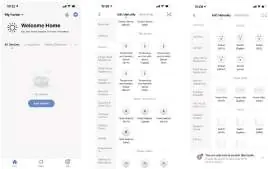
Pairing methods
The device supports two pairing modes:
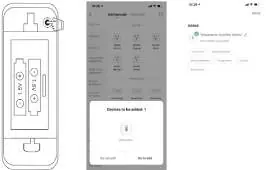
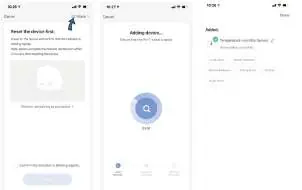
- Bluetooth mode: Turn on Bluetooth on your phone. Press and hold the pairing button on the sensor for 5 seconds until the LED flashes. The app will detect the device; select Go to add.
- EZ mode: Press and hold the pairing button for 5 seconds until the LED flashes rapidly. Select EZ mode in the app and follow the on-screen instructions.
App settings and alerts
Once connected, tap the sensor icon in the app to access settings:
- Alerts: Configure high and low temperature/humidity thresholds.
- Reporting cycle: Set the frequency for data synchronization (default is 120 minutes).
- Sensitivity: Adjust the sensitivity for temperature and humidity changes.
Smart features
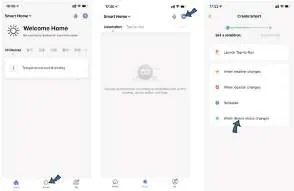
You can create intelligent interconnections, such as triggering an air conditioner when the temperature exceeds 35°C. The device also supports sharing with family members and voice control via Amazon Alexa and Google Assistant.
Practical help
Common problems
Device not pairing
Ensure Bluetooth is enabled on your phone, the device is in pairing mode (flashing LED), and you are connected to a 2.4GHz Wi-Fi network.
Temperature/Humidity data not updating
Check the reporting cycle settings in the app; the default is 120 minutes.
Before use
- Insert 2x LR03 batteries
- Download the Smart Life app
- Ensure 2.4GHz Wi-Fi is available
- Enable Bluetooth on your smartphone
Specs in practice
- Input voltage
- Requires 2x LR03 (AAA) batteries (DC 3V).
- Working temperature
- Operational range is -10°C to 55°C.
- Working humidity
- Operational range is 10% to 90% RH.
Images and diagrams
- The pairing button is located inside the battery compartment.
- The app interface allows setting alerts for high/low temperature and humidity.
Model compatibility
- Compatible with Amazon Alexa and Google Assistant.
- Requires 2.4GHz Wi-Fi network.

Manual page author
David Miller
Documentation analyst
Organizes user manual content into clear summaries, with attention to model details, product context, and everyday usability.