Home / Security
SOMOGYI ELEKTRONIC DB 1002AC/M Wireless Doorbell Set and Night Light
Comprehensive user manual for the DB 1002AC/M wireless doorbell set with integrated night light, covering installation, pairing, operation, and maintenance.
Table of contents
Product Overview
The SOMOGYI ELEKTRONIC DB 1002AC/M is a versatile wireless doorbell set designed for home use, featuring an integrated night light. It offers a reliable operating range of up to 100 meters in open terrain. The system supports up to 4 push-buttons simultaneously, allowing for flexible installation across multiple entry points. With 8 selectable polyphonic melodies, users can customize their doorbell sound to their preference. The receiver unit plugs directly into a standard 230 V power outlet, while the push-button is powered by a long-lasting CR2032 battery.
Installation and Pairing
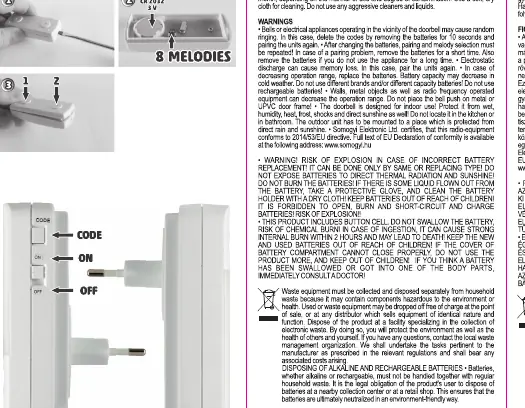
To begin using the device, remove the battery insulation strip from the push-button. Plug the receiver into a 230 V wall socket. The system uses a self-learning code system to prevent interference from other nearby doorbells. To pair or change the melody, press and hold the button on the side of the receiver for 5 seconds until you hear an acoustic signal. Within 5 seconds, press the push-button. The receiver will confirm the pairing with a sound. If you have multiple push-buttons, repeat this process for each one. To change the melody, press the button on the back of the push-button unit to cycle through the 8 available options.
Night Light Operation
The receiver unit includes a built-in night light feature. You can toggle this function on or off using the switch located on the side of the device. When the night light is active, it will automatically illuminate in low-light conditions, providing subtle ambient lighting without affecting the doorbell functionality.
Safety and Maintenance
For optimal performance, keep the device away from metal surfaces and electronic appliances that may cause interference. Do not expose the unit to direct sunlight, moisture, or extreme temperatures. Clean the device periodically using a soft, dry cloth; avoid using aggressive cleaning agents. If the doorbell is not in use for an extended period, remove the battery from the push-button to prevent leakage. The product contains a button cell battery; keep it out of reach of children to prevent ingestion hazards. If swallowed, seek medical attention immediately.
Disposal
This product must not be disposed of with regular household waste. At the end of its service life, it should be taken to a designated collection point for electronic waste to ensure proper recycling and environmental protection. Batteries must also be disposed of according to local regulations.
Manufacturer information
Somogyi Elektronic Kft.
Practical help
Common problems
Doorbell does not ring
Check if the receiver is plugged in and the push-button battery is correctly installed or needs replacement.
Interference from other devices
Perform the pairing process again to generate a new unique code for the system.
Before use
- Remove the battery insulation strip from the push-button
- Ensure the receiver is plugged into a 230V outlet
- Verify the push-button battery (CR2032) is installed correctly
- Check that the night light switch is in the desired position
Specs in practice
- Operating range
- Up to 100 meters in open terrain; obstacles may reduce this distance.
- Power supply
- Receiver: 230V AC; Push-button: 3V CR2032 battery.
- IP44 protection
- Protected against splashing water and solid objects larger than 1mm.
Images and diagrams
- The receiver features a side button for pairing and a switch for the night light.
- The push-button has a rear button for melody selection.
- The battery compartment is located on the back of the push-button.
Model compatibility
- Supports up to 4 push-buttons simultaneously.
- Compatible with standard 230V AC power outlets.

Manual page author
Michael Turner
Technical manual editor
Reviews PDF manuals for structure, safety notes, and practical product details so readers can find the right information quickly.