Home Appliances / Personal Care
SPL Crescendo Eight Channel Microphone Preamplifier User Manual
Quick start guide and operation manual for the SPL Crescendo eight-channel microphone preamplifier. Learn about setup, connections, phantom power, gain control, and technical specifications.
Table of contents
Manual images
Click an image to enlargeQuick guide from the manual
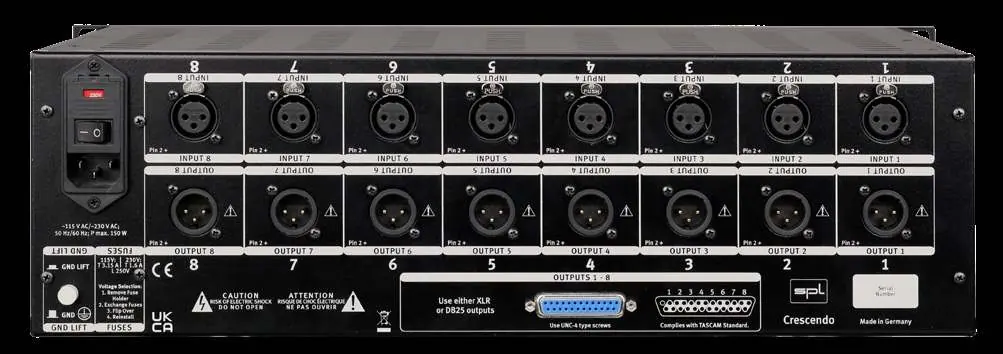
The SPL Crescendo is an eight-channel microphone preamplifier featuring 120V technology. To get started, ensure the mains voltage matches your region, connect the power cord, and set the rear mains switch to Off (O). Connect your audio interface or mixing console to the outputs and your microphones to the inputs using high-quality XLR cables. Switch the unit on (I) to begin operation.
Operation
Each of the eight channels offers independent control:
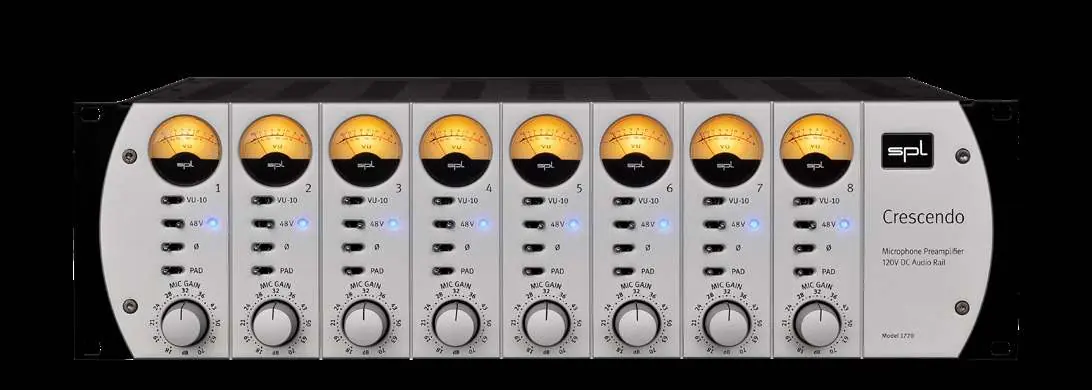
- Phantom Power (48V): Activate for condenser microphones. Important: Switch off for all other microphone types, especially ribbon microphones.
- Mic Gain: Use the potentiometer to adjust preamplification gain up to 70 dB.
- Polarity Inversal: Inverts the microphone signal polarity by 180°.
- PAD: Reduces the input signal level by 20dB if the signal is too hot.
- VU -10dB: Reduces the sensitivity of the VU meter if the needle deflects too far.
Power down
To turn off the device, set the mains switch on the back to the Off (O) position. The VU meters will stop lighting up.
Safety and Handling
Always ensure the device is placed in a stable position with adequate ventilation. Do not block ventilation holes. If the device is moved to a different temperature environment, allow time for condensation to dissipate before powering on. Disconnect the device from the mains during thunderstorms or when not in use for extended periods.
Specifications
- Frequency range: 20-70kHz (-3dB)
- Mic pre amp gain: 70 dB (adjustable)
- Input impedance: 10 kOhm
- Output impedance: 75 Ohm
- THD/N: 0.008% (10 Hz - 22 kHz, 30dB Gain)
- CMRR: 80dBu/1kHz
- Power consumption: 230V: 60 W / 115V: 80 W
Practical help
Common problems
No sound output
Check power connection, ensure the unit is switched on, and verify that microphones are connected correctly.
Input signal is distorted or too loud
Activate the PAD switch to reduce the input level by 20dB.
Condenser microphone not working
Ensure the 48V phantom power switch is activated for that channel.
VU meter needle deflects too far
Activate the VU -10dB switch to reduce the displayed sensitivity.
Before use
- Verify mains voltage matches your region.
- Ensure the mains switch on the rear is set to Off (O).
- Connect the supplied power cord to the device and a grounded outlet.
- Connect outputs to your audio interface or mixing console.
- Connect microphones to inputs 1-8 using high-quality XLR cables.
Specs in practice
- Mic pre amp gain
- Provides up to 70 dB of gain, adjustable via the front panel potentiometer.
- Input impedance
- 10 kOhm, suitable for standard professional microphone signals.
Images and diagrams
- Front panel: Contains 8 channels with individual VU meters, 48V phantom power, polarity inversion, PAD, and Mic Gain controls.
- Rear panel: Features 8 XLR inputs, 8 XLR outputs, and a DB25 output connector for multi-channel connectivity.
Model compatibility
- Use phantom power only for condenser microphones.
- Switch off phantom power for ribbon microphones to prevent damage.

Manual page author
Michael Turner
Technical manual editor
Reviews PDF manuals for structure, safety notes, and practical product details so readers can find the right information quickly.