Tools / Glue Guns
User Manual for Steinel MobileGlue 1007 / 1007-S Hot Glue Pen
Quick guide for the Steinel MobileGlue 1007 and 1007-S cordless hot glue pen. Includes setup, charging instructions, operation, safety warnings, and technical specifications.
Table of contents
Manual images
Click an image to enlargeQuick guide from the manual
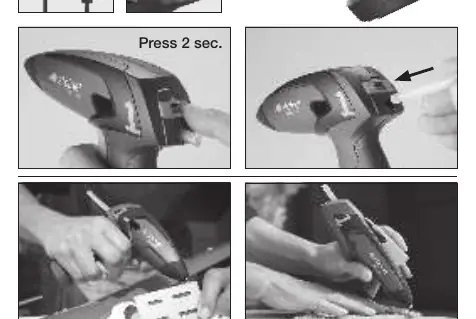
The Steinel MobileGlue 1007/1007-S is a cordless hot-melt glue pen designed for household use. Before first use, charge the battery fully (2-3 hours). To turn the device on, press and hold the button for approximately 2 seconds; the green LED will flash for 15 seconds. The device is ready for use when the LED remains lit.
Safety precautions
- Use the device only in dry rooms.
- Do not use in conjunction with highly flammable or combustible materials.
- Do not use on highly combustible surfaces (e.g., paper, textiles).
- The glue reaches temperatures up to 190°C. Avoid skin contact. If hot glue touches skin, cool immediately with cold water; do not attempt to remove the glue.
- Do not pull the glue stick out of the applicator.
- Do not leave the device unattended.
System components
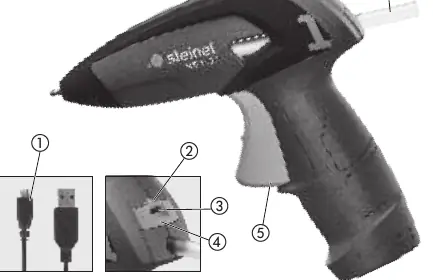
- USB charging cable
- LED display
- Socket for charging cable
- ON/OFF button
- Feed trigger
- Glue stick
Operating principle and handling
Insert the glue stick into the rear heating duct. When using for the first time, press the trigger several times to fill the heating chamber with adhesive. Press the trigger to apply glue to one side of the material. Firmly press the materials together. Final bonding strength is reached after approximately 2 minutes. For long items with large surfaces, spot gluing is recommended. For textiles, apply glue in wavy lines.
Charging and operation
The device cannot be used while charging. The battery is protected by Electronic Cell Protection (ECP) against deep discharge. If the battery is empty, the device switches off automatically. The LED display indicates charging status: red indicates charging, green indicates fully charged.
Technical specifications
- Battery: Lithium-ion, 3.6V, 1.5Ah
- Run time: Approx. 30 minutes continuous operation
- Charging time: 90% in 3 hours
- Warm-up time: Less than 15 seconds
- Melt temperature: Approx. 170°C
- Recommended glue sticks: Ø 7 mm original STEINEL sticks
Manufacturer information
STEINEL
Practical help
Common problems
Device does not turn on
Ensure the battery is charged. Press and hold the ON/OFF button for approximately 2 seconds.
Glue not flowing
Ensure the glue stick is inserted correctly. Press the feed trigger several times to fill the heating chamber.
Red LED flashing
Battery is empty. Connect the device to the USB charger.
Before use
- Charge the battery for 2-3 hours before first use
- Check the device and charging cable for damage
- Ensure the work surface is clean, dry, and grease-free
- Insert the glue stick into the rear heating duct
- Test heat-sensitive materials for suitability
Specs in practice
- Melt temperature
- Approx. 170°C, suitable for most craft materials.
- Battery run time
- Approx. 30 minutes of continuous use on a full charge.
- Charging time
- 90% charge achieved in 3 hours.
Images and diagrams
- Page 2 illustrates the device components: 1. USB cable, 2. LED display, 3. Charging socket, 4. ON/OFF button, 5. Feed trigger, 6. Glue stick.
Model compatibility
- Use only original STEINEL 7mm glue sticks (Cristal, Ultrapower, Color, or Glitter sticks).

Manual page author
David Miller
Documentation analyst
Organizes user manual content into clear summaries, with attention to model details, product context, and everyday usability.