Home Appliances / Fans
User Manual for Neo Tools 17-084 Glue Gun
Quick guide for the Neo Tools 17-084 4V USB glue gun. Learn how to charge, insert glue sticks, operate, and maintain your device safely.
Table of contents
Manual images
Click an image to enlargeQuick guide from the manual
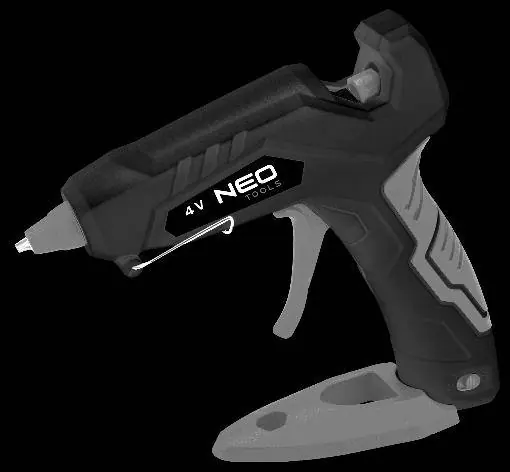
The Neo Tools 17-084 is a 4V USB-powered glue gun designed for 6.7-7.9 mm glue sticks. Before first use, ensure the device is fully charged. The device features a 3-5 minute warm-up time indicated by a blue LED. During operation, keep the device held by the handle and do not remove partially used glue sticks.
Charging
The device uses a 4V, 1-2A power supply. Do not use a power supply with different parameters. The device must be switched off during charging. A red LED indicates charging, and a green LED indicates a full charge. Do not use the device while it is charging.
Operation
- Ensure the device is fully charged.
- Insert a glue stick (6.7-7.9 mm diameter) into the rear opening until it stops.
- Slide the switch to the ON position to start the warm-up process.
- Wait 3-5 minutes for the device to heat up; the blue LED will light up.
- Press the trigger to dispense glue.
- For subsequent use, simply reheat the device.
Safety and Maintenance
- Age restriction: This equipment may be used by children 8 years and older and persons with limited physical, sensory, or mental abilities if supervised or instructed on safe use.
- Temperature: Charging should occur in a room temperature between 5-40°C.
- Handling: Do not dismantle, crush, or throw the device into fire.
- Battery: The battery contains harmful substances and must be disposed of according to local regulations. Fully discharge and wrap the battery in tape before disposal to prevent short circuits.
- Accessories: Use accessories from the manufacturer or reputable brands.
Troubleshooting
If glue does not flow immediately after the first charge, this is normal. The glue flow channel is empty upon first use and must be filled with melted glue before it can flow freely.
Practical help
Common problems
Glue does not flow immediately after first charge
The flow channel is empty upon first use. Continue to heat and press the trigger until the channel fills with melted glue.
Charging time varies
Charging time depends on the current charge level and ambient temperature. Very high or low temperatures may trigger internal protection.
Battery runtime varies
Long periods of non-use cause self-discharge. Intensive use will also drain the battery faster. Charge and discharge the battery several times to improve performance.
Before use
- Ensure the device is fully charged using a 4V, 1-2A power supply.
- Check that the glue stick diameter is between 6.7 mm and 7.9 mm.
- Ensure the ambient temperature is between 5°C and 40°C.
- Verify the device is switched off before charging.
Images and diagrams
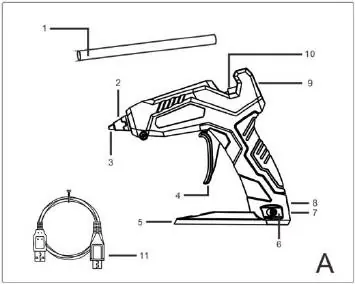
- Fig A: Overview of the glue gun components, including the trigger, nozzle, and USB port.
- Fig B: Illustration of the glue stick insertion process into the rear opening.
Model compatibility
- Compatible with glue sticks of 6.7-7.9 mm diameter.

Manual page author
Michael Turner
Technical manual editor
Reviews PDF manuals for structure, safety notes, and practical product details so readers can find the right information quickly.