Electronics / Routers
Sygonix 1080P Outdoor WiFi Camera
A robust 1080P outdoor WiFi security camera featuring motion detection, night vision, and IP65 weather resistance, managed via the Smart Life - Smart Living app.
Table of contents
Product Overview
The Sygonix 1080P Outdoor WiFi Camera is designed for outdoor security, connecting to your home network via WiFi. It is controlled through the Smart Life - Smart Living mobile application. The camera features integrated motion sensors that trigger push notifications to your mobile device. For low-light conditions, it includes an infrared LED that automatically activates when ambient light drops below a certain threshold, allowing for black-and-white recording.
Installation and Setup
Before installation, ensure the camera lens protective film is removed. Choose a mounting location within range of your WiFi access point; if the signal is weak, a WiFi repeater may be required. The camera is IP65 rated, protecting it against dust and low-pressure water jets. Ensure the power cable and adapter are protected from the elements. Use the provided mounting plate as a template for drilling, secure the bracket to the wall, and attach the camera.
Operation and App Pairing
The camera powers on automatically when connected to the power supply. To pair with the app, ensure your mobile device is connected to a 2.4 GHz WiFi network. The camera will emit beeps to indicate it is ready for pairing. If the camera fails to pair or needs to be reconfigured, use the reset button located in the internal compartment. Hold the reset button for 4-5 seconds until a long beep is heard to initiate the reset process.
Storage and Motion Detection
The camera supports microSD cards (up to 128 GB, Class 10, FAT32/exFAT format) for local storage. When a card is inserted, the camera saves 15-second video clips upon motion detection. If no card is present or the card is full, the camera will still send push notifications, allowing you to view live video via the app. Note that placing the camera behind glass may cause glare from the infrared LEDs, resulting in overexposed images.
Maintenance and Safety
Always disconnect the power supply before cleaning. Use a lint-free, slightly dampened cloth to clean the device. Avoid aggressive cleaning agents, alcohol, or chemical solvents, as these can damage the housing. Ensure the compartment cover is properly sealed with the rubber gasket after inserting an SD card or resetting the device to maintain its IP65 rating.
Manufacturer information
Sygonix GmbH
Practical help
Common problems
Camera not pairing with the app
Ensure you are using a 2.4 GHz network, check the WiFi password, and perform a reset by holding the reset button for 4-5 seconds.
Overexposed images at night
Avoid placing the camera behind glass, as infrared reflections can cause glare.
No video clips saved
Ensure a microSD card is inserted and formatted to FAT32/exFAT. If the card is full, no new clips will be saved.
Before use
- Remove the protective film from the camera lens.
- Ensure the WiFi network is 2.4 GHz.
- Format the microSD card to FAT32 or exFAT.
- Check that the mounting surface is suitable for the provided screws.
- Ensure the power adapter is protected from water and dust if used outdoors.
- Verify the rubber gasket is correctly seated in the compartment cover.
Specs in practice
- 2.4 GHz WiFi
- The only compatible wireless frequency band for this device.
Images and diagrams
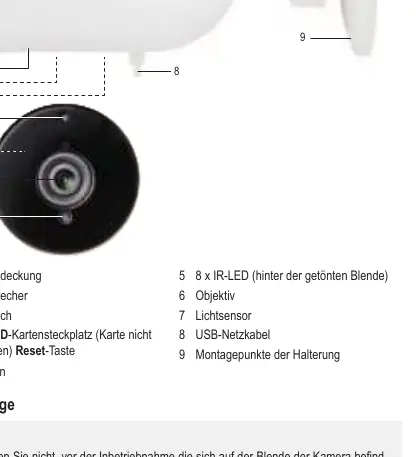
- The compartment cover houses the microSD card slot and the reset button.
- The IR LEDs are located behind the tinted front cover for night vision.
- The light sensor automatically triggers the night vision mode.
- The bracket mounting points are located on the rear of the camera housing.
Model compatibility
- Compatible only with 2.4 GHz WiFi networks.
- Requires Android 4.2+ or iOS 9.0+ for the mobile application.
- Supports microSD cards up to 128 GB (Class 10).

Manual page author
David Miller
Documentation analyst
Organizes user manual content into clear summaries, with attention to model details, product context, and everyday usability.