Electronics / Cameras
Tamron 17-50mm F/4 Di III VXD Lens Owner's Manual
Comprehensive guide for the Tamron 17-50mm F/4 Di III VXD lens, covering installation, operation, safety precautions, and maintenance for optimal performance.
Table of contents
Product Overview
The Tamron 17-50mm F/4 Di III VXD is a high-performance lens designed for Sony E-mount cameras. It features a versatile zoom range, internal focusing system, and a dedicated connector port for firmware updates and custom function assignments via the Tamron Lens Utility software.
Technical Specifications
- Model: A068
- Focal Length: 17-50 mm
- Maximum Aperture: F/4
- Angle of View: 103°41' - 46°48'
- Minimum Focus Distance: 0.19m (wide) / 0.3m (tele)
- Filter Size: 67 mm
- Weight: 460 g
- Connector Type: USB Type-C
Installation and Operation
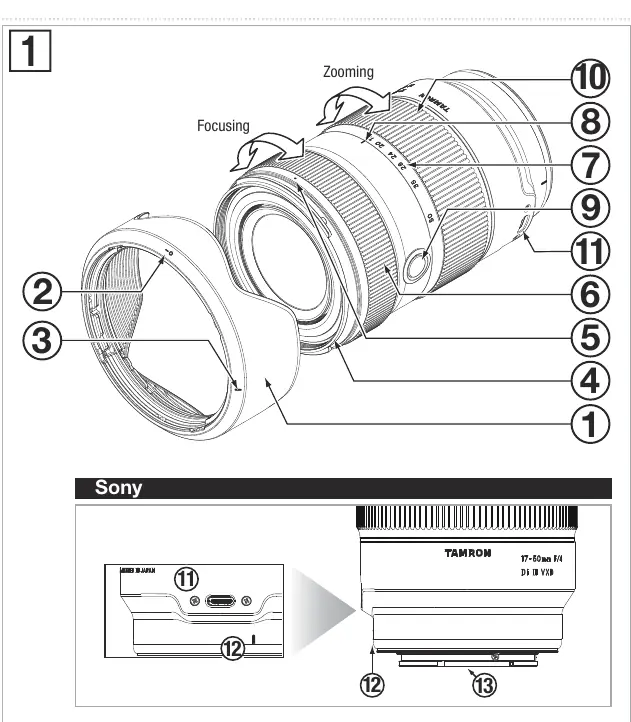
To attach the lens, align the lens attachment mark with the camera mount and rotate clockwise until it clicks. Always turn off the camera power before attaching or removing the lens. Use the zoom ring to adjust the focal length and the focus ring for manual focusing. The focus set button can be customized using the Tamron Lens Utility application when connected to a computer via a compatible USB-C cable.
Lens Hood Usage
The included lens hood protects against unwanted light. Align the hood attachment mark with the lens index mark and rotate until the locking mark aligns with the release mark. For storage, the hood can be attached in reverse.
Safety Precautions
For safe operation, never look directly at the sun or strong light sources through the lens, as this may cause vision damage or fire. Do not disassemble or modify the lens. Keep the lens away from children to prevent injury from accidental drops. Avoid leaving the lens in direct sunlight or high-temperature environments like cars, as this can damage internal components.
Maintenance and Care
Clean the lens surface with a blower or a dry cloth after removing dust. Never use organic solvents like thinner or benzine. Store the lens in a clean, well-ventilated area. If the lens is exposed to sudden temperature changes, condensation may form; allow the lens to acclimate to room temperature before use. Avoid touching the lens-camera interface contacts with your fingers to prevent malfunctions.
Related manuals
Related manuals from the same brand or category.

Manual page author
Emily Carter
User documentation editor
Prepares concise manual descriptions and highlights the most useful setup, operation, and maintenance information for readers.