Mobile / Smartphones
User Manual for TECNO SPARK 30 Pro Smartphone
Quick guide for the TECNO SPARK 30 Pro smartphone. Learn how to identify device components, install SIM/SD cards, charge your phone safely, and understand regulatory compliance.
Table of contents
Manual images
Click an image to enlargeQuick guide from the manual
This document provides essential instructions for the TECNO SPARK 30 Pro smartphone, covering device layout, SIM card installation, and charging procedures. It also includes important regulatory information regarding FCC compliance and SAR exposure limits.
Know your phone
The device features the following physical components:
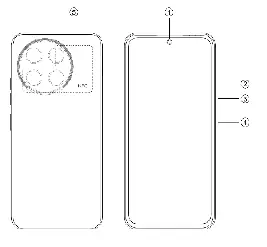
- 1. Front camera
- 2. Volume + button
- 3. Volume - button
- 4. Power button
- 5. NFC
SIM/SD card installation
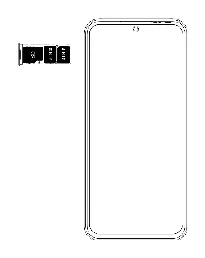

- Power off your phone completely before attempting to insert or remove cards.
- Follow the provided diagram to correctly insert your SIM or SD card into the tray.
Charging the phone
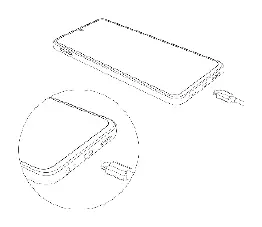
You can charge your phone using a wall charger or by connecting it to a computer via the included USB cable. Important: Use only official TECNO chargers and cables. Using third-party accessories may damage the device and invalidate the warranty.
Regulatory information
This device complies with Part 15 of the FCC Rules. It is designed to meet government requirements for exposure to radio waves (SAR). Ensure a minimum separation distance of 1.0 cm from the body during operation. Third-party belt-clips or holsters should not contain metallic components.
Practical help
Common problems
Device not charging or charging slowly
Use only original TECNO chargers and cables. Third-party accessories may cause damage or slow charging.
SIM/SD card not detected
Ensure the phone is powered off before installation and that the card is seated correctly in the tray.
Before use
- Power off the phone before inserting SIM/SD cards.
- Use only the provided or official TECNO charging cable and adapter.
- Maintain a 1.0 cm separation distance from the body for RF exposure compliance.
Specs in practice
- SAR Limit (USA)
- 1.60 W/kg averaged over one gram of tissue.
- Body-worn SAR
- 0.34 W/kg (tested at 1.0 cm separation).
Images and diagrams
- The phone layout diagram identifies the front camera, volume buttons, power button, and NFC area.
- The SIM/SD card installation diagram shows the correct orientation for the card tray.
Model compatibility
- Compatible with standard SIM and SD cards.
- Requires 1.0 cm separation from the body for RF exposure compliance.
- Use only TECNO-approved accessories.

Manual page author
Emily Carter
User documentation editor
Prepares concise manual descriptions and highlights the most useful setup, operation, and maintenance information for readers.