General / Other Manuals
Testo 104-IR Combined Infrared and Penetration Thermometer
The Testo 104-IR is a robust, dual-purpose food thermometer featuring both infrared surface measurement and a fold-out penetration probe for core temperature checks.
Table of contents
Product Overview
The Testo 104-IR is a versatile, robust thermometer specifically designed for the food industry. It combines two measurement methods in one device: non-contact infrared measurement for surface temperatures and a fold-out penetration probe for measuring the core temperature of liquid, pasty, and semi-solid media. This dual functionality makes it an essential tool for production, food service, spot checks, and incoming goods inspections.
Safety Information
To ensure safe operation and maintain warranty coverage, please adhere to the following guidelines:
- Do not perform measurements on or near live electrical parts.
- Do not store the device with solvents such as acetone.
- Only open the device for maintenance or repair if explicitly described in the documentation.
- Dispose of defective batteries at designated collection points.
Operation
The device can be switched on by either unfolding the probe (activates contact measurement) or by pressing the [ON] button (activates infrared measurement). The device features an automatic shut-off function to conserve battery life. For infrared measurements, use the 2-point laser to mark the edges of the measurement area. For contact measurements, ensure the probe is inserted to a depth of at least 10 times its diameter for accurate readings.
Maintenance and Cleaning
Keep the infrared lens clean and free of dust, dirt, or moisture. Use only mild, neutral household cleaning agents to clean the housing and probe. The device is suitable for alcohol-based spray disinfection. If the device is not used for an extended period, remove the batteries to prevent leakage.
Troubleshooting
If the device displays errors or fails to switch on, check the battery status first. If measurement values are outside the permissible range, the display will indicate this. For persistent issues, contact Testo customer service.
Manufacturer information
Testo SE & Co. KGaA
Practical help
Common problems
Battery icon lights up
Batteries are nearly empty; replace them.
IR or contact measurement displays '---'
Measured values are outside the permissible range; ensure the object is within the device's measurement limits.
Instrument cannot be switched on
Batteries are dead; replace them.
Instrument switches itself off
Automatic shut-off triggered after 10 minutes (contact mode) or 1 minute (IR mode); switch the instrument on again.
Before use
- Ensure the infrared lens is clean and free of fog.
- Check that batteries are inserted with correct polarity.
- Verify the measurement mode (IR or contact) is appropriate for the task.
- Ensure the measurement area is free of obstacles like dust or steam.
- Allow 15 minutes for the device to equalize if ambient temperature has changed significantly.
Specs in practice
- Optical Resolution (10:1)
- The ratio of distance to the measurement spot diameter; at 100mm distance, the spot size is 10mm.
- Emissivity (0.95)
- Factory default setting optimized for food, non-metals, and plastics.
- Protection Class (IP65)
- The device is protected against dust ingress and low-pressure water jets.
Images and diagrams
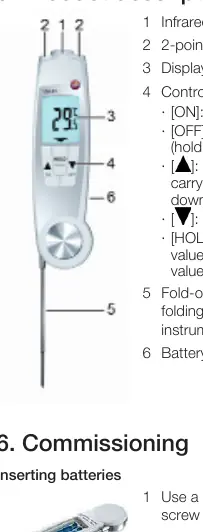
- The device features a fold-out probe that acts as an on/off switch.
- The infrared sensor and 2-point laser are located at the top of the unit.
- Control keys allow switching between IR and contact modes and holding values.
- The battery compartment is located on the back and requires a slotted screwdriver to open.
Model compatibility
- Designed for continuous contact with foodstuffs according to Regulation (EC) 1935/2004.
- Not suitable for use in potentially explosive areas.
- Not intended for diagnostic measurements in the medical sector.

Manual page author
Emily Carter
User documentation editor
Prepares concise manual descriptions and highlights the most useful setup, operation, and maintenance information for readers.