Electronics / Media Players
Thomson QLED Pro 144Hz Smart TV Installation Guide
Quick installation and setup guide for the Thomson QLED Pro 144Hz Smart TV. Includes VESA wall mounting dimensions, connectivity options, remote control pairing, and picture settings.
Table of contents
Manual images
Click an image to enlargeQuick Start Guide
Before installing your Thomson QLED Pro 144Hz Smart TV, please observe the following safety and handling guidelines:
- Handling: Always use two people to lift or move the TV to prevent damage.
- Screen Protection: Do not touch the screen surface during handling.
- Power: Use only the supplied power cable.
Mounting and Installation
The TV can be installed using the provided stand or mounted on a wall using a VESA-compatible mount. Ensure you check the specific VESA dimensions for your screen size:
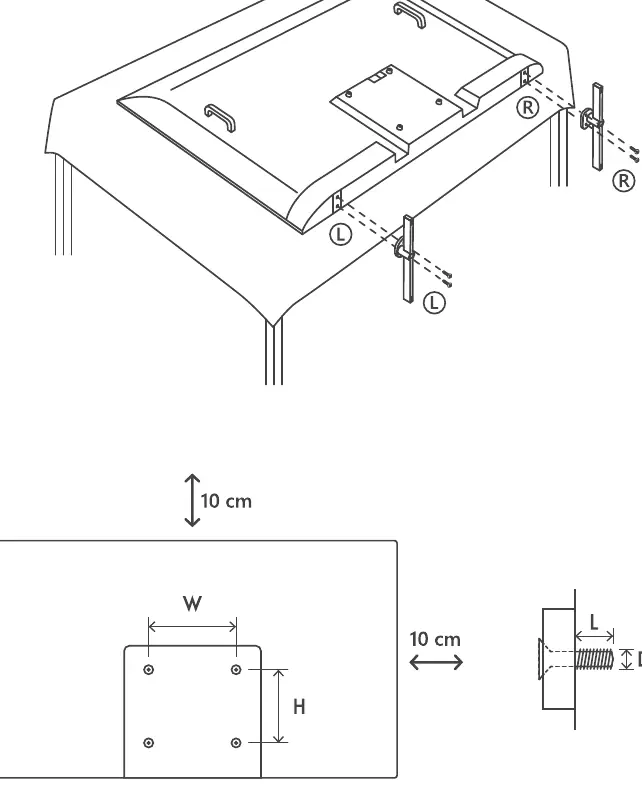
- 43" - 75": Follow the specific mounting sequence provided in the manual.
- 85" - 100": Requires specific handling due to size.
- VESA Wall Mount: Refer to the VESA table for your specific model size to determine the correct hole pattern (W x H) and screw type (M6 or M8). Ensure a 10 cm clearance around the unit for ventilation.
Connectivity
The TV features various ports for external devices:
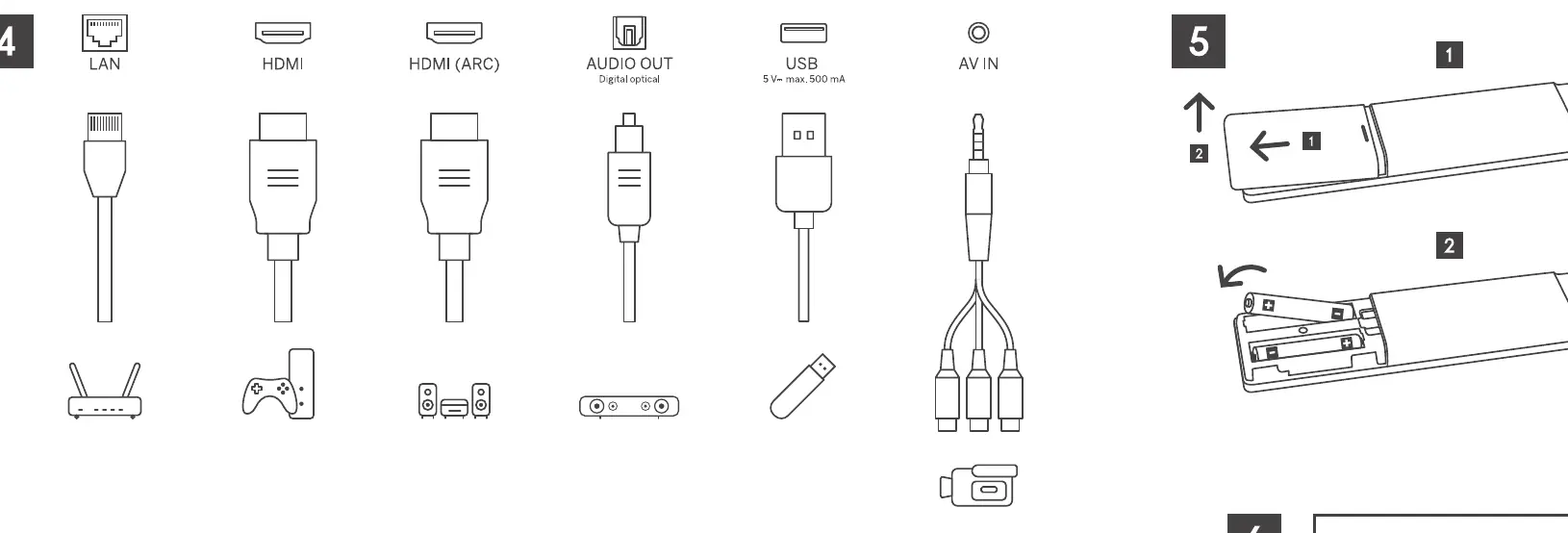
- Video/Audio: HDMI (including ARC), AV IN, Satellite, and Antenna inputs.
- Data/Peripherals: USB ports, LAN (Ethernet), and CI+ Module slot for pay-TV cards.
- Audio Output: Digital optical audio output and headphone jack.
Remote Control and Settings
To pair the remote control:
- Ensure the remote is within 20-30 cm of the TV.
- Follow the on-screen instructions or hold the pairing button for 5-15 seconds.
Picture Settings: If the picture appears too dark, you can adjust the mode:
- Press the Settings button on the remote.
- Navigate to Picture >Picture Mode.
- Select your desired mode and confirm with OK.
Energy Saving
The TV includes built-in energy-saving features. Refer to the on-screen menu for configuration options.
Practical help
Common problems
Remote control not pairing
Ensure the remote is held within 20-30 cm of the TV and hold the pairing button for 5-15 seconds.
Picture is too dark
Go to Settings > Picture > Picture Mode and select a different preset mode.
Before use
- Use two people to lift the TV.
- Do not touch the screen surface.
- Use only the supplied power cable.
- Verify VESA mount dimensions for your specific TV size.
- Ensure 10 cm clearance around the TV for ventilation.
Images and diagrams
- Remote pairing requires close proximity (20-30 cm) to the TV.
- VESA mounting requires specific screw lengths (M6 or M8) depending on the screen size.
Model compatibility
- Netflix streaming requires a subscription.
- Google Assistant availability varies by country and language.
- 4K Ultra HD availability depends on internet speed and subscription plan.

Manual page author
Michael Turner
Technical manual editor
Reviews PDF manuals for structure, safety notes, and practical product details so readers can find the right information quickly.