Furniture / Home Furnishing
User Manual for Trinity Barnwood Mirror 16x20MIR-NAT
Complete assembly and installation guide for the Trinity Barnwood Mirror (16x20MIR-NAT, 16x20MIR-WW). Includes parts list, step-by-step mounting instructions, care tips, and warranty information.
Quick answers from the manual
Quick answer
- The Trinity Barnwood Mirror is installed by marking the desired height, leveling a mounting line 1-inch below that height, drilling pilot holes 14 inches apart, installing drywall anchors, and hanging the mirror on the screws. p. 3, 4, 5
Key actions
- Marking mounting points p. 3, 4
- Installing anchors and screws p. 4, 5
- Hanging the mirror p. 5
Problems and fixes
Missing parts
Contact Trinity Customer Service at 800.985.5506 or [email protected].
p. 2, 8Maintenance and reset
- Clean with a damp cloth and/or mild dish soap; dry completely. p. 6
Where to find it in the PDF
- Parts List p. 2
- Assembly Instructions p. 3, 4, 5
- Care and Maintenance p. 6
- Warranty p. 7
Table of contents
Manual images
Click an image to enlargeQuick guide from the manual
This manual provides instructions for assembling and mounting the Trinity Barnwood Mirror. Before beginning, ensure you have all parts and the necessary tools: a pencil, level, drill, 1/4-inch drill bit, and a Phillips bit. If you are mounting on a surface other than drywall, you may need to purchase appropriate specialty hardware.
Parts list
- A: Mirror (1)
- B: Screw (2)
- C: Drywall Anchor (2)
Assembly and installation
Follow these steps to mount your mirror:
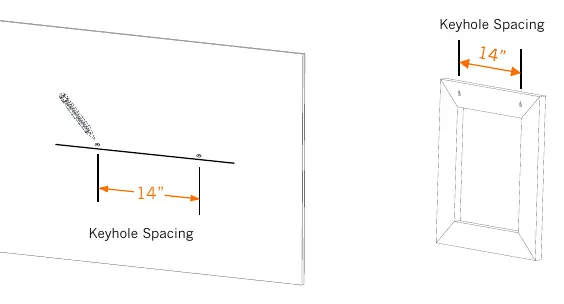

- Step 1: Place the mirror against the wall and mark the top of the mirror at your desired height. Note that the mounting screw height will be 1-inch lower than this mark.
- Step 2: Position a level 1-inch lower than the mark made in Step 1 and draw a leveled horizontal line for the mounting screw height.
- Step 3: On the mounting screw height line, mark two points 14 inches apart, corresponding to the spacing of the keyholes on the back of the mirror.
- Step 4: Use a 1/4-inch drill bit to drill two pilot holes at the marked points. Insert the drywall anchors (C) into the holes until they are flush with the wall.
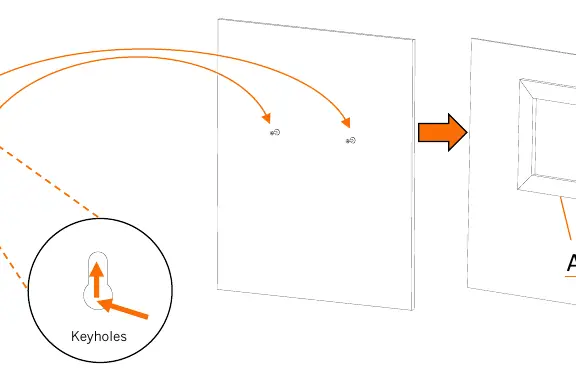
- Step 5: Insert the screws (B) into the drywall anchors (C) using a drill with a Phillips bit. Leave the screw head 1/4-inch exposed to allow room for hanging.
- Step 6: Slide the mirror (A) over the screws until they insert into the keyholes, then lower the mirror until it locks into place.
Warnings
- Read and understand all instructions before use.
- Do not modify the product in any way.
- Check for damaged parts before use; do not use if damaged.
- Do not overload the product.
Care and maintenance
- Avoid harsh, abrasive cleaners and corrosive chemicals.
- Do not use scouring pads.
- Clean with a damp cloth and/or mild dish soap.
- Dry completely with a dry sponge or cloth.
Warranty and support
This product includes a 1-year limited warranty. For missing parts, assembly assistance, or warranty claims, contact Trinity Customer Service at 800.985.5506 or email [email protected]. Support is available Monday through Friday, 5:00 AM – 5:00 PM (PST).
Practical help
Common problems
Missing parts or assembly assistance needed
Contact Trinity Customer Service at 800.985.5506 or [email protected].
Mounting on non-drywall surfaces
You may need to purchase specialty screws and anchors suitable for your specific wall material.
Before use
- Inspect box contents to ensure all parts (Mirror, Screws, Anchors) are present.
- Gather required tools: pencil, level, drill, 1/4-inch bit, and Phillips bit.
- Verify the wall surface is suitable for the included drywall anchors.
Specs in practice
- 1/4-inch bit
- The size of the drill bit required for the pilot holes.
- 1/4-inch exposed
- The distance the screw head should protrude from the wall to allow the mirror to hang securely.
Images and diagrams
- Keyholes: The slots on the back of the mirror frame that hook onto the screw heads.
Model compatibility
- Included hardware is designed for drywall installation only.

Manual page author
David Miller
Documentation analyst
Organizes user manual content into clear summaries, with attention to model details, product context, and everyday usability.