Lighting / Fixtures
Utilitech 18-Inch Oscillating Pedestal Fan
Keep your home cool with the Utilitech 18-inch oscillating pedestal fan, featuring adjustable height, tilt, 3 speed settings, and a convenient remote control.
Table of contents
Product Overview
The Utilitech 18-inch oscillating pedestal fan is designed for household use, providing efficient air circulation with three adjustable speed settings. It features a stable base, adjustable height, and a tilting head to direct airflow exactly where you need it. The fan includes a remote control for convenient operation.
Safety Information
Read all instructions before use. To reduce the risk of fire, electric shock, or injury:
- Do not immerse the unit, plug, or cord in water.
- Keep the fan away from open flames, cooking appliances, or explosive fumes.
- Ensure the fan is on a stable, dry surface during operation.
- Do not operate the fan if the cord or plug is damaged.
- Never insert fingers or objects through the grille while the fan is running.
- Always unplug the fan before cleaning, moving, or when not in use.
- This product uses a polarized plug and includes an overload protection fuse. If the fuse blows, unplug the unit and replace it with a 2.5 Amp, 125-volt fuse.
Assembly
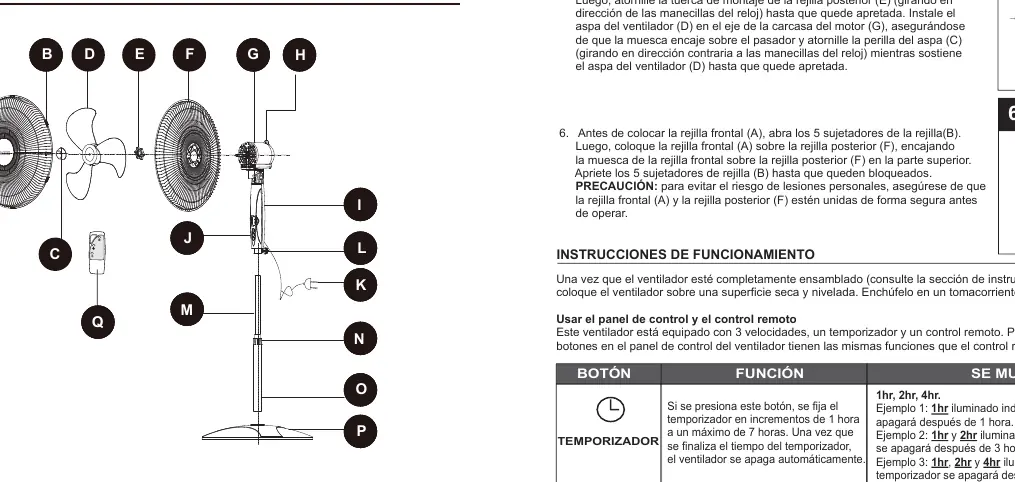
The fan requires no tools for assembly. Start by inserting the pillar into the base. Adjust the height using the height adjustment knob on the pillar. Attach the upper pole to the height-adjustable pole. Secure the rear grille to the motor housing, install the fan blade, and lock it with the blade knob. Finally, attach the front grille using the grille clips, ensuring it is securely fastened before operation.
Operation
Once assembled, plug the fan into a 120V AC outlet. Use the control panel or the included remote control to manage settings:
- Power: Turn the fan on or off.
- Speed: Cycle through low, medium, and high speeds.
- Timer: Set the fan to automatically shut off in 1-hour increments, up to 7 hours.
- Oscillation: Press the knob on top of the motor housing to start horizontal oscillation; pull it up to stop.
- Tilt: Gently push the fan head up or down to adjust the angle.
Care and Maintenance
The fan is permanently lubricated and requires no additional lubrication. To clean, turn off and unplug the fan. Use a lint-free cloth to wipe away dust. Keep the motor vents free of dust using a vacuum hose. Grilles and blades can be cleaned with mild soap and water; ensure they are completely dry before reassembly. Store in a dry place and never wrap the cord tightly around the fan.
Related manuals
Related manuals from the same brand or category.
Home Appliances / Washing Machines
Utilitech Rotating Wireless Charging Pad 1310836UT4
Utilitech
Manual page author
Emily Carter
User documentation editor
Prepares concise manual descriptions and highlights the most useful setup, operation, and maintenance information for readers.