V7 01GY19 65W USB-C PD Charger User Guide
Quick start guide for the V7 01GY19 65W USB-C PD charger, covering plug installation, removal, and power output specifications for single and dual device charging.
Table of contents
Quick guide from the manual
This document provides instructions for the V7 01GY19 65W USB-C PD charger, including how to attach and remove regional power plugs and technical specifications for power output.
Plug installation and removal
The charger features a modular plug system supporting US, EU, and UK standards.
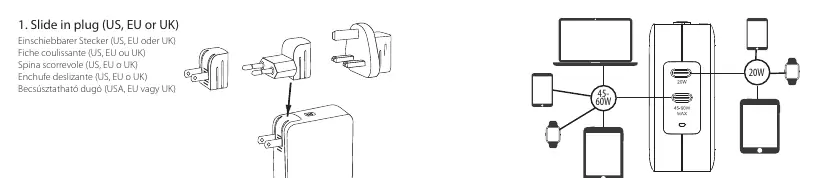
- To install: Slide the desired regional plug into the charger body until it clicks into place.
- To remove: Slide the top lever forward and pull the plug out of the charger body.
Power output and usage
The charger features two USB-C ports: a 20W port and a 45-60W port. Power distribution depends on the number of devices connected:
- Using 1 device: The 20W port provides up to 20W (5V/3A, 9V/2.22A). The 45-60W port provides up to 60W (5V/3A, 9V/3A, 15V/3A, 20V/3A).
- Using 2 devices: The 20W port provides up to 20W (5V/3A, 9V/2.22A). The 45-60W port provides up to 45W (5V/3A, 9V/3A, 15V/3A, 20V/2.25A).
Technical specifications
- Input: 100-240V AC, 50/60Hz
- Standby power consumption: 0.3W
Practical help
Common problems
Ensure the plug is fully slid into the locking mechanism. If removing, ensure the top lever is pushed forward completely before pulling.
Before use
- Verify the regional plug (US, EU, or UK) matches your wall outlet.
- Ensure the plug is securely attached to the charger.
- Check that your device cables are compatible with USB-C PD standards.

Manual page author
David Miller
Documentation analyst
Organizes user manual content into clear summaries, with attention to model details, product context, and everyday usability.