Mobile / Smartphones
Quick Start Guide for Xiaomi 11T Pro
A quick start guide for the Xiaomi 11T Pro, covering device setup, SIM card installation, safety precautions, and regulatory information.
Table of contents
Manual images
Jump to the sectionQuick guide from the manual
This guide provides essential information for setting up and safely using your Xiaomi 11T Pro. Key actions include powering on the device, configuring it via on-screen instructions, and correctly installing SIM cards.
Device Overview
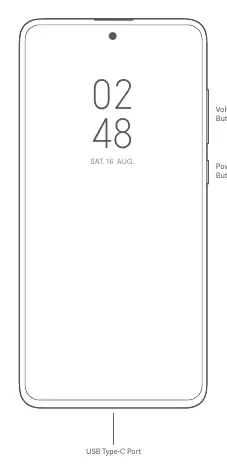
The device features volume buttons and a power button on the side, with a USB Type-C port located at the bottom.
SIM Card Tray
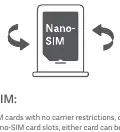
The device supports Dual Nano-SIM cards. To install, use the SIM card tray. Note that the device supports Dual 5G, 4G, 3G, and 2G, as well as Dual SIM VoLTE. Do not insert non-standard SIM cards as they may damage the slot.
First Use
To turn on the device, long-press the power button. Follow the on-screen instructions to complete the initial configuration. The device comes pre-installed with MIUI, an Android-based operating system.
Important Safety Information
- Operating Temperature: 0°C to 40°C.
- Battery Safety: Do not attempt to replace the battery yourself. Do not disassemble, hit, crush, or burn the battery. If the battery appears deformed or damaged, stop using it immediately.
- Charging: Use only authorized cables and power adapters. Do not charge for more than 12 hours.
- General Safety: Keep the device dry. Do not use unauthorized accessories. Do not use the phone while charging or in high-humidity environments like bathrooms.
- Medical Interference: Maintain a minimum distance of 15 cm from pacemakers.
Regulatory and Compliance
The device complies with EU and FCC regulations regarding RF exposure (SAR). It is restricted to indoor use only when operating in the 5150 to 5350 MHz frequency range in certain regions. For detailed certification information, go to Settings > About phone > Certification.
Manufacturer information
Xiaomi Corporation
Practical help
Common problems
Device does not work properly
Do not attempt to repair it yourself. Contact Mi customer support or visit an authorized repair center.
Battery appears deformed or damaged
Stop using the device immediately and contact an authorized repair center.
Potential interference with medical devices
Maintain a minimum distance of 15 cm between the phone and pacemakers; avoid carrying the phone in a breast pocket.
Before use
- Ensure you are using authorized cables and power adapters.
- Check that your SIM cards are standard Nano-SIM size.
- Verify the operating environment is within 0°C to 40°C.
- Update the operating system using the built-in software update feature.
Specs in practice
- Operating Temperature
- 0°C to 40°C; usage outside this range may damage the device.
- SAR Limit (Head/Trunk)
- 2.0 W/kg (10g limit) for EU compliance.
- 5G Connection
- Depends on country, carrier, and user environment.
Images and diagrams
- The diagram shows the location of the volume buttons and power button on the right side of the device.
- The diagram indicates the USB Type-C port is located at the bottom center of the device.
- The SIM card tray illustration shows the correct orientation for inserting a Nano-SIM card.
Model compatibility
- Supports Dual Nano-SIM cards.
- Supports Dual 5G/4G/3G/2G and VoLTE.
- Restricted to indoor use in the 5150-5350 MHz range in specific countries.

Manual page author
David Miller
Documentation analyst
Organizes user manual content into clear summaries, with attention to model details, product context, and everyday usability.