Mobile / Smartphones
User Guide for Xiaomi 13T Smartphone
Quick start guide for the Xiaomi 13T, including device setup, SIM card installation, safety precautions, and regulatory information.
Table of contents
Quick guide from the manual
This document provides essential information for setting up and safely using your Xiaomi 13T smartphone. Key actions include powering on the device and configuring it via on-screen instructions. Please note that the device is intended for indoor use in specific frequency ranges and must be handled according to the provided safety guidelines.
Device Overview
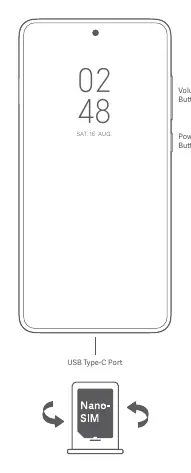
The Xiaomi 13T features a USB Type-C port for charging and data transfer. Physical controls include volume buttons and a power button located on the side of the device. The SIM card slot is designed for Nano-SIM cards.
Getting Started
To turn on your device, press and hold the power button. Follow the on-screen instructions to complete the initial configuration. For further assistance, visit the official website at www.mi.com/global/service/userguide.
Safety Information
To ensure safe operation and prevent damage to your device or injury, please adhere to the following:
- Use only authorized cables, power adapters, and accessories.
- The operating temperature range is 0°C to 40°C.
- Do not attempt to replace the built-in battery yourself; contact an authorized repair center.
- Do not charge the device for more than 12 hours.
- Keep the device dry and do not disassemble, crush, or burn the battery.
- Avoid using the phone in high-humidity areas like bathrooms or during thunderstorms.
- Maintain a minimum distance of 15 cm from medical devices like pacemakers.
Software and Updates
The device comes with MIUI pre-installed. It is recommended to use the built-in software update feature to keep your operating system current and secure.
Regulatory and Compliance
The device complies with EU and UK regulations regarding radio equipment and RF exposure (SAR). Specific absorption rate (SAR) limits are 2.0 W/kg for head and body (10g). The device is restricted to indoor use in the 5250-5350 MHz frequency range in many countries. For detailed regulatory information, visit www.mi.com/en/certification.
Official resources from the manual
Manufacturer information
Xiaomi Corporation
Practical help
Common problems
Device does not work properly
Contact Mi customer support or bring the device to an authorized repair center.
Battery appears deformed or damaged
Stop using the device immediately and contact an authorized repair center.
Interference with radio or TV reception
Reorient the receiving antenna, increase separation between equipment, or connect to a different outlet.
Before use
- Ensure you are using only authorized cables and power adapters.
- Check that the SIM card is a standard Nano-SIM.
- Verify the operating environment is between 0°C and 40°C.
- Ensure the device is kept dry.
- Check for software updates via the built-in feature.
Specs in practice
- Operating Temperature
- 0°C to 40°C; usage outside this range may damage the device.
- SAR Limit (EU/UK)
- 2.0 W/kg (10g) for head and body.
- Charging Limit
- Do not charge for more than 12 hours.
Images and diagrams
- The device features volume buttons and a power button on the right side.
- The USB Type-C port is located at the bottom of the device.
- The SIM card slot is designed for Nano-SIM cards.
Model compatibility
- Restricted to indoor use in the 5250-5350 MHz range in EU member states.
- Restricted to indoor use in the 5150-5350 MHz range in Hong Kong.
- Use only authorized accessories compatible with your device.

Manual page author
Emily Carter
User documentation editor
Prepares concise manual descriptions and highlights the most useful setup, operation, and maintenance information for readers.