Documents / Warranty Safety
Xiaomi 14T Pro A402XM(15) Access Point (APN) Configuration Guide
Step-by-step guide for configuring the Access Point Name (APN) settings on your Xiaomi 14T Pro A402XM(15) to ensure mobile data connectivity.
Table of contents
APN Configuration Overview
To ensure your Xiaomi 14T Pro A402XM(15) can access mobile data services, you must correctly configure the Access Point Name (APN) settings. Please follow the steps below to establish a connection to the network.
Important Pre-configuration Step
Before beginning the configuration process, ensure that the Wi-Fi connection is turned off on your device. This allows the phone to prioritize the mobile network settings during the setup process.
Step-by-Step Setup Instructions
- Access Settings: From the home screen, locate and tap the Settings icon.
- Mobile Network: Within the Settings menu, select the Mobile Network option.
- Select Carrier: Tap on the specific carrier profile, such as au, to proceed to the SIM card settings.
- Access Point Names: Select the Access Point Names (APN) option to view the list of available network configurations.
- Enable Network: Select and enable the 5G NET profile from the list provided.
Verification
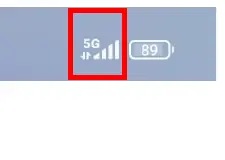
Once the settings have been applied, look at the top status bar of your screen. If you see the 4G or 5G indicator icon, the configuration is successful, and your mobile data service is ready for use.
Related manuals
Related manuals from the same brand or category.
Mobile / Smartphones
Xiaomi 14T Smartphone User Guide
XiaomiMobile / Smartphones
Xiaomi 14T Pro
XiaomiMobile / Smartphones
Xiaomi 14T Quick Start Guide
XiaomiDocuments / Warranty Safety
Xiaomi 14T: User Manual and Warranty Information
XiaomiMobile / Smartphones
Xiaomi 14T Pro User Guide
XiaomiMobile / Smartphones
Xiaomi Redmi Note 14S User Guide
XiaomiMobile / Smartphones
Redmi 14C Smartphone Overview
XiaomiMobile / Smartphones
Xiaomi Redmi 14C User Guide
XiaomiMobile / Smartphones