Mobile / Smartphones
Xiaomi 14T Quick Start Guide
Essential setup, safety, and regulatory information for the Xiaomi 14T smartphone.
Table of contents
Getting Started
To turn on your Xiaomi 14T, press and hold the power button. Follow the on-screen instructions to complete the initial configuration of your device. For detailed user guides and further support, visit the official Xiaomi website.
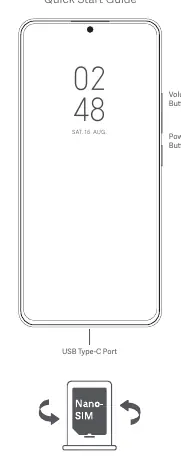
SIM Card Installation
Use only standard SIM cards in the designated slot. Inserting non-standard cards may damage the internal mechanism. Do not attempt to disassemble the device yourself.
Important Safety Information
- Operating Temperature: The device is designed to operate between -20°C and 60°C.
- Battery Safety: Use only authorized chargers and cables. Do not attempt to replace the built-in battery yourself. Avoid exposing the battery to high temperatures, crushing, or puncturing, as this may cause fire or explosion.
- Charging: Disconnect the charger after use and do not charge for more than 12 hours continuously.
- Hearing Protection: To prevent potential hearing damage, avoid listening at high volume levels for extended periods.
- General Precautions: Keep the device dry. Do not use the phone in explosive environments, such as petrol stations, or near medical equipment like pacemakers, maintaining a minimum distance of 15 cm.
Maintenance and Troubleshooting
If the device or any of its components do not function correctly, contact authorized customer support or visit an official service center. Do not attempt unauthorized repairs. Always keep your operating system updated using the built-in software update feature to ensure security and optimal performance.
Disposal and Recycling
This product must not be disposed of with regular household waste. Please follow local regulations regarding the recycling of electronic devices and batteries to protect the environment and human health.
Regulatory Information
The device complies with international standards for radio frequency exposure (SAR). It is certified for use within the EU and adheres to FCC regulations. For specific certification details, you can access the E-label on your device by navigating to Settings, then About phone, and selecting Certification.
Related manuals
Related manuals from the same brand or category.
Mobile / Smartphones
Xiaomi 14T Pro
XiaomiMobile / Smartphones
Xiaomi 14T Pro User Guide
XiaomiMobile / Smartphones
Xiaomi Redmi Note 14S User Guide
XiaomiMobile / Smartphones
Redmi 14C Smartphone Overview
XiaomiMobile / Smartphones
Xiaomi Redmi 14C User Guide
XiaomiDocuments / Warranty Safety
Important Safety Information and Precautions for Xiaomi 14T
XiaomiElectronics / Routers