Computers / Tablets
User Manual for Xiaomi Pad 8 Tablet
Quick start guide for the Xiaomi Pad 8 tablet. Learn how to power on, configure, charge safely, and perform a factory reset.
Table of contents
Manual images
Click an image to enlargeQuick Start Guide
To turn on your Xiaomi Pad 8, press and hold the power button. Follow the on-screen instructions to configure the device for initial use.
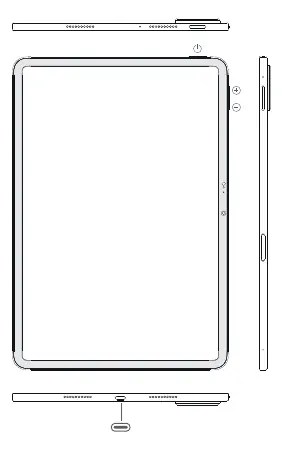
Charging the Tablet
To charge your tablet, you can use the USB cable included in the box with a Mi brand charger, or connect the tablet to a computer using a USB data cable. Please note the following charging requirements:
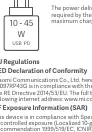
- Charging Power: The product supports chargers with a maximum output of 45W.
- Compatibility: You can use third-party chargers that comply with USB 2.0 or higher protocol standards and meet the requirements of international safety standards (IEC 60950 or IEC 62368-1).
- Safety: Do not charge the device for more than 12 hours. After charging is complete, disconnect the adapter from both the device and the power outlet.
Important Safety Information
Read all safety information before using your device to prevent fire, explosion, or other risks:
- Temperature: The operating temperature range is 0°C to 40°C. Using the device outside this range may cause damage.
- Battery Safety: Do not attempt to replace the built-in battery yourself. Do not disassemble, hit, crush, or burn the battery. If the battery appears deformed or damaged, stop using it immediately.
- Usage Restrictions: Do not use the tablet in explosive atmospheres, such as petrol stations or fueling areas. Keep the device away from medical equipment like pacemakers (maintain a minimum distance of 15 cm).
- Maintenance: Keep the device dry. Do not attempt to repair the device yourself; contact Mi customer support or an authorized repair center.
Device Management
Factory Reset
To erase local data on the device, including accounts, contacts, photos, videos, apps, and backups, follow this path:
Settings > About tablet > Factory reset
E-label
To access certification information, go to Settings > About tablet > Certification, or open Settings and type "Certification" into the search bar.
Manufacturer information
Xiaomi Corporation
Practical help
Common problems
Device not charging
Ensure you are using the included cable and a compatible charger (max 45W). Do not charge for more than 12 hours.
Device unresponsive
Try a long press on the power button to force a restart.
Interference with medical devices
Maintain a minimum distance of 15 cm from pacemakers and other medical equipment.
Before use
- Ensure the device is dry.
- Check that the power adapter is compatible (USB 2.0 or higher, max 45W).
- Verify the operating temperature is between 0°C and 40°C.
- Ensure the socket-outlet is easily accessible.
Specs in practice
- Operating Temperature
- 0°C to 40°C. Using outside this range may damage the device.
- Charging Power
- Supports up to 45W. Use authorized chargers only.
Images and diagrams
- The diagram on page 2 shows the layout of the power button, volume buttons, and USB-C charging port.
Model compatibility
- Compatible with third-party chargers complying with USB 2.0 or higher and IEC 60950/62368-1 standards.

Manual page author
Emily Carter
User documentation editor
Prepares concise manual descriptions and highlights the most useful setup, operation, and maintenance information for readers.